 Get-Inky
Inky Mall OS costs $99 for Core or $199 for Pro up front, then $20 a year to keep the license active. It rings sales when the Wi-Fi is down and pays every booth to the penny. And if you want it, the Inky app lets your vendors see and manage their booth in real time, right from their phones.
Every feature. No card. Runs on your store's Windows or Mac computer.
Built and proven in working antique malls, ringing sales every day.

Pick one, paid once.
Keeps your register running. Starting year two.
Every register in sync, the Inky app connection, the card reader, and vendors checking their booth from home.
Your vendors never pay a cent to see their booth. It's part of the store's Cloud+.
Hold that up against what you pay now.
We come from resale. We stood behind the counter and knew exactly what we needed: a register that keeps ringing when the Wi-Fi drops, pays every booth right, and doesn't send a bill every month. So we built it.
Now that it's running in real malls, the gaps in the market are easy to see. Most mall registers bill you every month, forever. Many only run in a web browser. Some still won't run on a Mac. Inky Mall OS is $99 for Core or $199 for Pro up front, then $20 a year. It runs on Windows and Mac, and it keeps selling when the internet doesn't.
— The Inky team


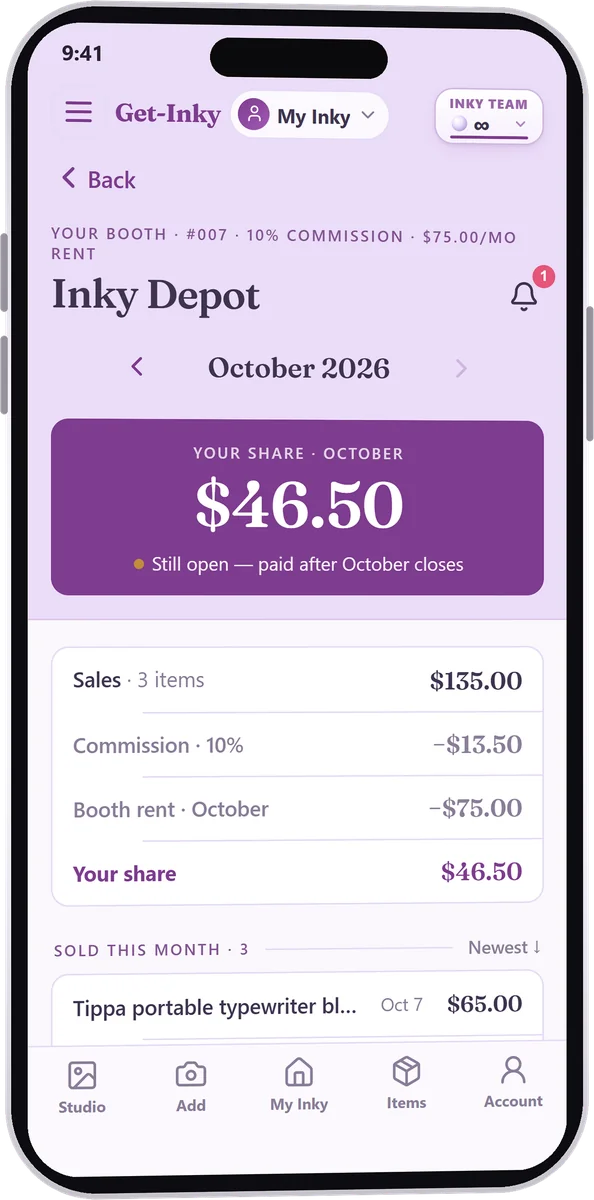
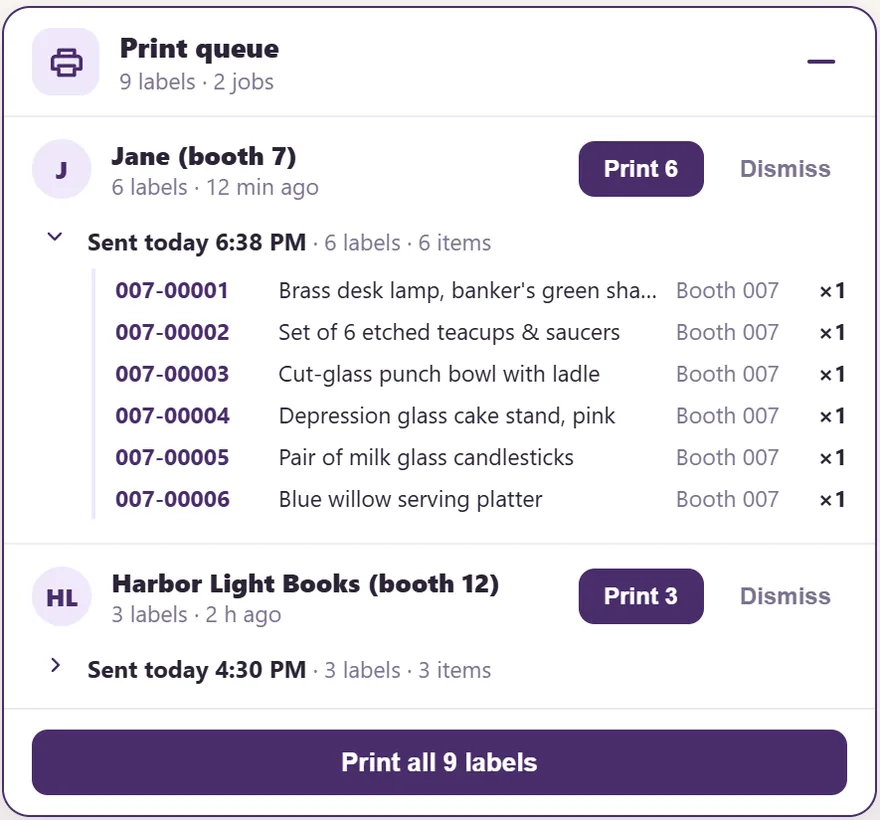
Mall OS is the register, and it's complete on its own. Add items at the register or load them from a spreadsheet, and bring your booths and sales history over from your old system. The Inky app is a separate tool that works alongside it: vendors see and manage their booth in real time, and a pile of their photos becomes tagged inventory on your floor without anyone retyping it.
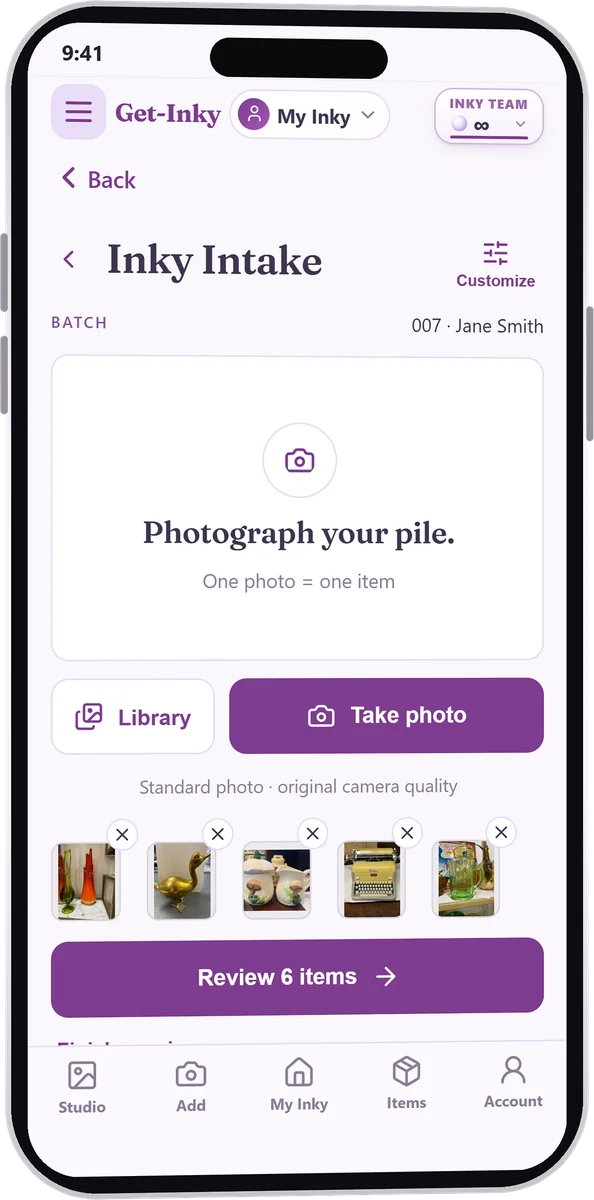
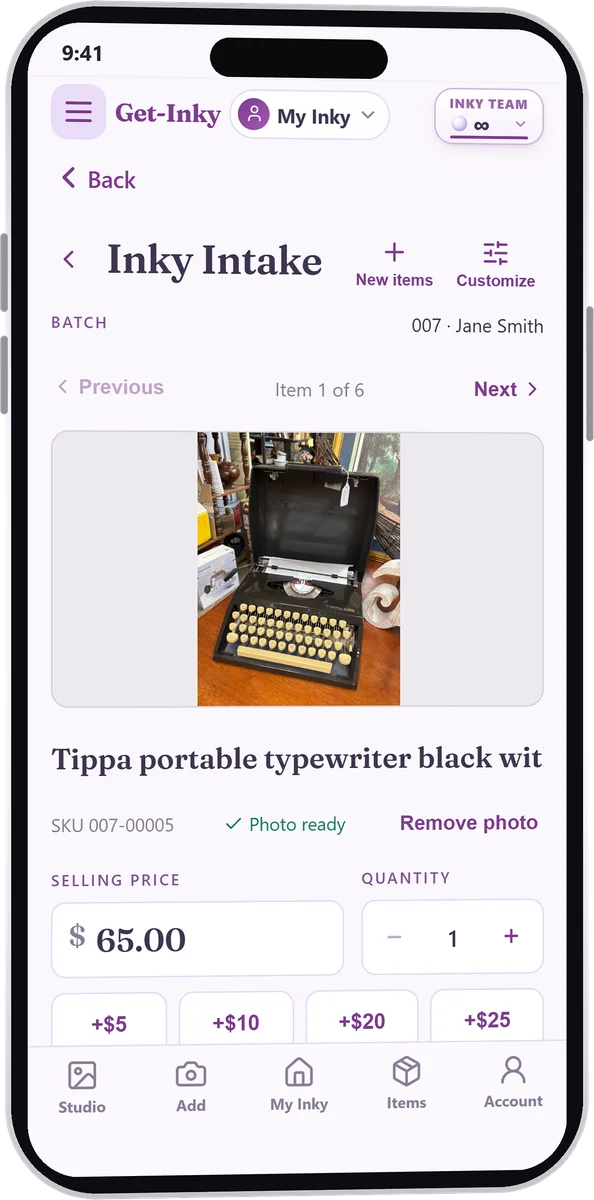
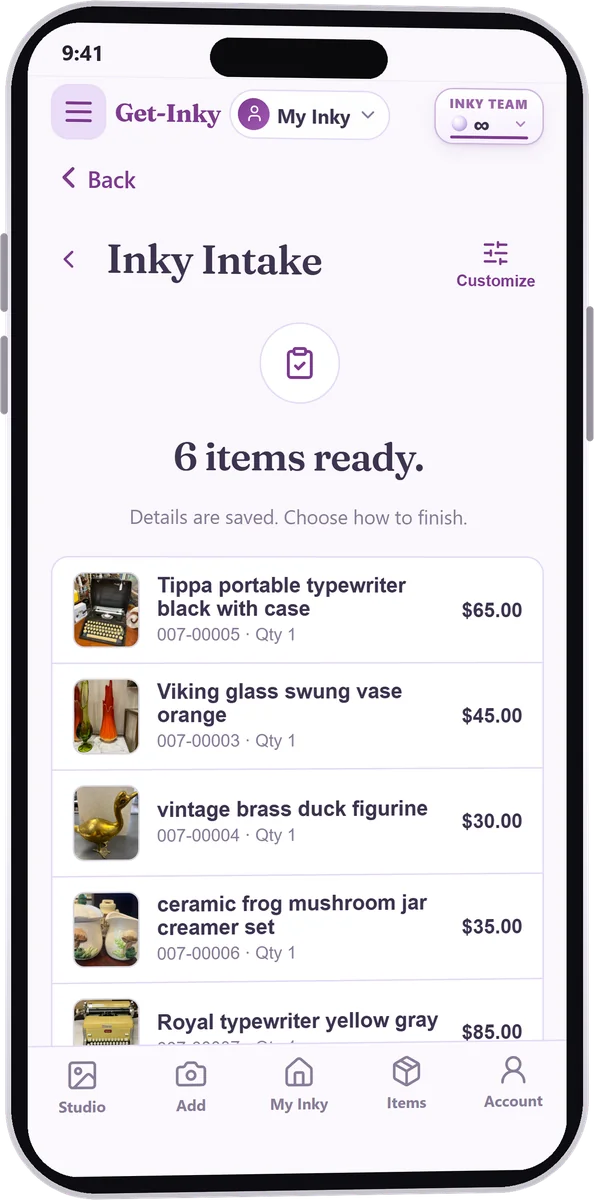
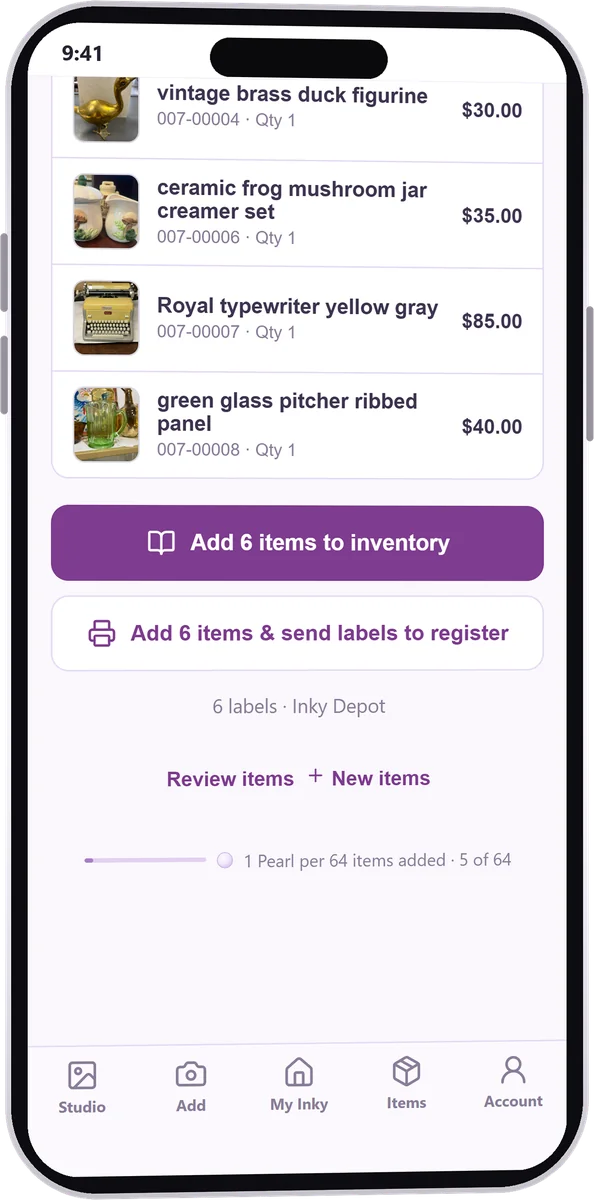
Swipe to see each step

Not sure what to charge? The app's What's it worth? looks it up. The app connection runs on Cloud+.

Booths, sales history and customers come over from your old system's backup. Items load from any spreadsheet. Inky shows you the totals and checks they match before anything is saved.
30 days, every feature, no card. Run it beside your old register and see.
It lives on your own computer. If the trial ends or a license lapses, nothing is deleted. Add a key and you're back where you left off.
They can check their booth at the counter with a PIN. Vendors who want the app can use it, and nobody has to.
One price up front, then $20 a year to keep the license active. One license covers your account.
The lean offline register.
one-time + $20/yr
Every heavier feature, one low license.
one-time + $20/yr
Needs Mall OS, Core or Pro
Also from Inky: Inky Accounting. Replace QuickBooks: expenses and receipts, profit & loss on real income, and year-end tax worksheets. Not part of Mall OS. It comes with an Inky online plan, Helping Hand ($9.99/mo) and up. See online plans
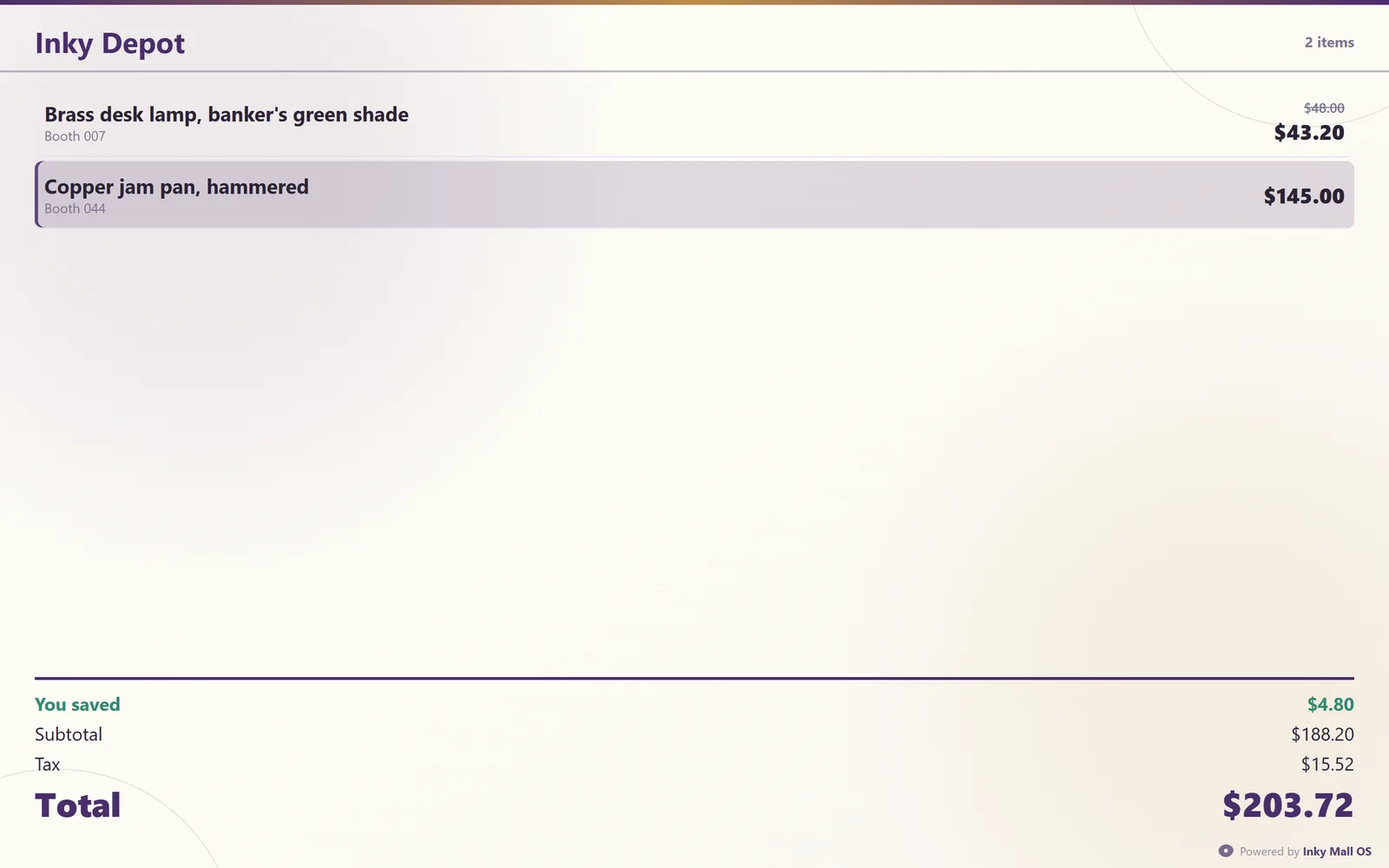
Nothing changes at the counter. Mall OS runs on your own computer, so sales, receipts, discounts, gift cards and layaways all keep working. The only things that wait for the internet are syncing between registers and the Square card reader. They catch up on their own when you're back.
No. It runs on Windows or Mac, and an older computer is fine. Add a barcode scanner, a label printer, a receipt printer and a cash drawer if you want them. Without a label printer, tags print on sheet labels from any printer. On a Mac, printers connect over your network.
Yes. Booths, sales history and customers come over from your old system's backup. Items load from any spreadsheet. Inky shows you the totals and checks they match before anything is saved.
No. Mall OS is a complete register on its own. Add items at the register or load them from a spreadsheet, and bring your booths and sales history over from your old system. The Inky app is a bonus for vendors who want to see and manage their booth in real time, and stock it from their phone. If your vendors want to stock their booth from home, it takes a little setup: Cloud+ for the store, and an invite code for each vendor.
The register locks until you add a license. Nothing is deleted. Paste your key and you're back exactly where you left off.
You get 30 days of reminders while everything keeps running. After that the register locks, with every bit of your data safe. Renew and it opens again instantly.
No. Cash, checks and wallet payments go straight to you, and the Square card reader pays into your own Square account. Inky records the sale. It never holds your money.
Yes. With Cloud+, pair a Square card reader to each register and the money lands in your Square account. Already have a card machine? Ring the sale as "Card" and keep using it.
Up to 5 on one account. With Cloud+ they stay in step live: ring a sale on one and the others update.
No. Vendors see their booth at the counter with a PIN, and from home with the store's Cloud+. They never pay to see their sales.
You do. Your whole store is one file on your computer. If you use OneDrive, it's backed up there automatically. With Cloud+, a new computer is a sign-in away.
With Cloud+, install Inky on the new computer, sign in, and your store loads. It takes about ten minutes. Without Cloud+, your store file is waiting in OneDrive if you use it.
If you can ring a sale, you can run it. A full searchable manual is built in, and real people answer at [email protected].
Windows & Mac · Six booths or six hundred
Not the owner?
Inky Mall OS costs $99 for Core or $199 for Pro up front, then $20 a year to keep the license active. It splits every sale with your consignor the moment it rings, keeps track of every item's end date, and keeps ringing when the Wi-Fi is down. Add Cloud+ and your consignors get their own web dashboard to see their sales from home, so the “did anything sell?” calls stop.
Every feature. No card. Runs on your store's Windows or Mac computer.

Pick one, paid once.
Keeps your register running. Starting year two.
Every register in sync, the Inky app connection, the card reader, and consignors checking their sales from home.
Your consignors never pay a cent to check their sales. It's part of the store's Cloud+.
Hold that up against what you pay now.
We come from resale. A consignment shop runs on three things: a split on every sale, a date on every item, and a consignor who wants to know what sold. Most consignment software handles that for a monthly bill, forever, and only inside a web browser. When the internet drops, so does your counter.
Inky Mall OS runs on your own computer, Windows or Mac. It's $99 for Core or $199 for Pro up front, then $20 a year, and it keeps selling when the internet doesn't.
— The Inky team


Mall OS is the register, and it's complete on its own. The Inky app works alongside it: when a consignor drops off a box, photograph the pile and it becomes tagged inventory under that consignor, without anyone retyping it.
Swipe to see each step

Not sure what to charge? The app's What's it worth? looks it up. The app connection runs on Cloud+.
Load consignors and items from any spreadsheet, with the date each agreement started.
30 days, every feature, no card. Run it beside your old register and see.
It lives on your own computer. If the trial ends or a license lapses, nothing is deleted. Add a key and you're back where you left off.
They can check at the counter with a PIN, or from home on their own page.
One price up front, then $20 a year to keep the license active. One license covers your account.
The lean offline register.
one-time + $20/yr
Every heavier feature, one low license.
one-time + $20/yr
Needs Mall OS, Core or Pro
Also from Inky: Inky Accounting. Replace QuickBooks: expenses and receipts, profit & loss on real income, and year-end tax worksheets. Not part of Mall OS. It comes with an Inky online plan, Helping Hand ($9.99/mo) and up. See online plans
Nothing changes at the counter. Mall OS runs on your own computer, so sales, receipts, discounts, gift cards and layaways all keep working. The only things that wait for the internet are syncing between registers and the Square card reader. They catch up on their own when you're back.
No. It runs on Windows or Mac, and an older computer is fine. Add a barcode scanner, a label printer, a receipt printer and a cash drawer if you want them. Without a label printer, tags print on sheet labels from any printer. On a Mac, printers connect over your network.
Yes. Load consignors and items from a spreadsheet, with the date each agreement started.
No. Mall OS is a complete register on its own. Add items at the register or load them from a spreadsheet. The Inky app is a bonus for checking in a drop-off from a phone. That takes a little setup: Cloud+ for the store, and the app connected to your store.
No. Each consignor logs in to their own page to see their sales, what's on your floor, what's expiring and what they're owed. Nothing for you to send.
It shows on your expiring list, then expired. Put it on the consignor's pickup list, or close it out as donated or store-owned.
The register locks until you add a license. Nothing is deleted. Paste your key and you're back exactly where you left off.
You get 30 days of reminders while everything keeps running. After that the register locks, with every bit of your data safe. Renew and it opens again instantly.
No. Cash, checks and wallet payments go straight to you, and the Square card reader pays into your own Square account. Inky records the sale. It never holds your money.
Yes. With Cloud+, pair a Square card reader to each register and the money lands in your Square account. Already have a card machine? Ring the sale as "Card" and keep using it.
Up to 5 on one account. With Cloud+ they stay in step live: ring a sale on one and the others update.
No. They check at the counter with a PIN, and from home on their own page with the store's Cloud+. They never pay to see their sales.
You do. Your whole store is one file on your computer. If you use OneDrive, it's backed up there automatically. With Cloud+, a new computer is a sign-in away.
With Cloud+, install Inky on the new computer, sign in, and your store loads. It takes about ten minutes. Without Cloud+, your store file is waiting in OneDrive if you use it.
If you can ring a sale, you can run it. A full searchable manual is built in, and real people answer at [email protected].
Windows & Mac · Ten consignors or ten thousand
Not the owner?
Inky Mall OS costs $99 for Core or $199 for Pro up front, then $20 a year to keep the license active. Rent your booths and take consignment on one register: rent and commission for booth renters, splits, fees and end dates for consignors, and one payout run for everyone. It keeps ringing when the Wi-Fi is down. Add Cloud+ and your vendors and consignors see their sales from home, so the “what sold?” calls stop.
Every feature. No card. Runs on your store's Windows or Mac computer.
Pick one, paid once.
Keeps your register running. Starting year two.
Every register in sync, the Inky app connection, the card reader, and every seller checking their sales from home.
Your vendors and consignors never pay a cent to see their sales. It's part of the store's Cloud+.
Hold that up against what you pay now.
Plenty of stores do both: booths along the walls, consignment racks in the middle. That shouldn't mean two systems, or a spreadsheet on the side for the second one. And it shouldn't mean a monthly bill forever, or a register that stops when the internet does.
Inky Mall OS runs both on your own computer, Windows or Mac, for $99 for Core or $199 for Pro up front, then $20 a year.
— The Inky team
Mall OS is the register, and it's complete on its own. The Inky app works alongside it: booth renters stock their booth from their phone, and you can check in a consignor's drop-off the same way. A pile of photos becomes tagged inventory without anyone retyping it.
Swipe to see each step
Not sure what to charge? The app's What's it worth? looks it up. The app connection runs on Cloud+.
Booths, sales history and customers come over from your old mall system's backup. Consignors and items load from a spreadsheet, with the date each agreement started.
30 days, every feature, no card. Run it beside your old register and see.
It lives on your own computer. If the trial ends or a license lapses, nothing is deleted. Add a key and you're back where you left off.
Everyone can check at the counter with a PIN. Booth renters who want the app can use it, and consignors get their own page.
One price up front, then $20 a year to keep the license active. One license covers your account.
The lean offline register.
one-time + $20/yr
Every heavier feature, one low license.
one-time + $20/yr
Needs Mall OS, Core or Pro
Also from Inky: Inky Accounting. Replace QuickBooks: expenses and receipts, profit & loss on real income, and year-end tax worksheets. Not part of Mall OS. It comes with an Inky online plan, Helping Hand ($9.99/mo) and up. See online plans
Nothing changes at the counter. Mall OS runs on your own computer, so sales, receipts, discounts, gift cards and layaways all keep working. The only things that wait for the internet are syncing between registers and the Square card reader. They catch up on their own when you're back.
No. It runs on Windows or Mac, and an older computer is fine. Add a barcode scanner, a label printer, a receipt printer and a cash drawer if you want them. Without a label printer, tags print on sheet labels from any printer. On a Mac, printers connect over your network.
Yes. Booths, sales history and customers come over from your old mall system's backup. Consignors and items load from a spreadsheet, with the date each agreement started.
No. Mall OS is a complete register on its own. Add items at the register or load them from a spreadsheet, and bring your booths and sales history over from your old system. The Inky app is a bonus for vendors who want to see and manage their booth in real time, and stock it from their phone. If your vendors want to stock their booth from home, it takes a little setup: Cloud+ for the store, and an invite code for each vendor.
No. Each consignor logs in to their own page to see their sales, what's on your floor, what's expiring and what they're owed. Nothing for you to send.
It shows on your expiring list, then expired. Put it on the consignor's pickup list, or close it out as donated or store-owned.
The register locks until you add a license. Nothing is deleted. Paste your key and you're back exactly where you left off.
You get 30 days of reminders while everything keeps running. After that the register locks, with every bit of your data safe. Renew and it opens again instantly.
No. Cash, checks and wallet payments go straight to you, and the Square card reader pays into your own Square account. Inky records the sale. It never holds your money.
Yes. With Cloud+, pair a Square card reader to each register and the money lands in your Square account. Already have a card machine? Ring the sale as "Card" and keep using it.
Up to 5 on one account. With Cloud+ they stay in step live: ring a sale on one and the others update.
No. Everyone checks at the counter with a PIN, and from home with the store's Cloud+. Nobody pays to see their sales.
You do. Your whole store is one file on your computer. If you use OneDrive, it's backed up there automatically. With Cloud+, a new computer is a sign-in away.
With Cloud+, install Inky on the new computer, sign in, and your store loads. It takes about ten minutes. Without Cloud+, your store file is waiting in OneDrive if you use it.
If you can ring a sale, you can run it. A full searchable manual is built in, and real people answer at [email protected].
Windows & Mac · Booths, consignors, or both
Not the owner?