
Inky the octopusGet-Inky

Reseller inventory app

Know what you have and where it is

Reselling gets messy fast: bins of stock, half-listed items, and the one thing that sold but you can't find. Inky keeps every item in one place with its photos, its price, where it's listed and which bin it's in.
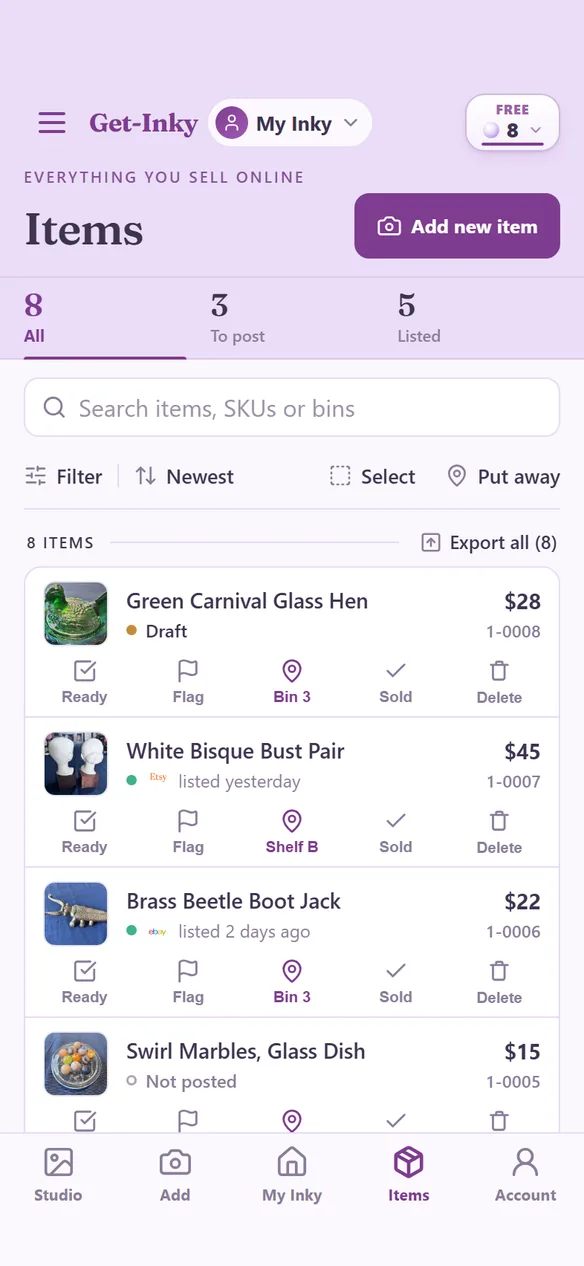
  1. Snap the pile. Open Inky Intake and snap items one after another. Each photo becomes its own item with a SKU, and Inky names it from the photo.
  2. Put it away. Give every item a spot: a bin, a shelf, a tote. Pick a bin once, then tap each item as you drop it in.
  3. Find anything. Search All items, or filter by marketplace, status or location. Each item keeps its photos, its listings and how many you have on hand.
  4. Sell it. Mark it sold and Inky tells you which bin it's in, then reminds you to take the listing down everywhere else.

8 free Pearls to startNo card64 items per Pearl

Inventory first, listings when you're ready.

Adding an item doesn't mean writing a listing. Get the whole haul in, then open any item and tap Write my listing when it's that item's turn.

Stop selling what you no longer have.

When something sells, Inky lists every other place it was posted, one tap each, with a door to your own listing there. Inky nudges and you act.

Your money follows the item.

When you mark an item sold you can record where it sold, what it sold for, what you paid and the fees. The sale shows up in Financials.

What it costs.

Inky Intake files 64 items for one Pearl, and new accounts start with 8 free Pearls. That's 512 items.

Good to know

  • A deleted item sits in Deleted for 30 days and can be put back.
  • Hundreds of bins are fine, and a bin never changes an item's SKU.
  • Run a booth or a shop? Pick the booth first and items file straight to it.
  • Works in the Inky app on iPhone and Android, and in a web browser.

Get your stock in.

New to reselling? Read the guides