
Inky the octopusGet-Inky

Whatnot bulk upload

Build your Whatnot CSV from your photos

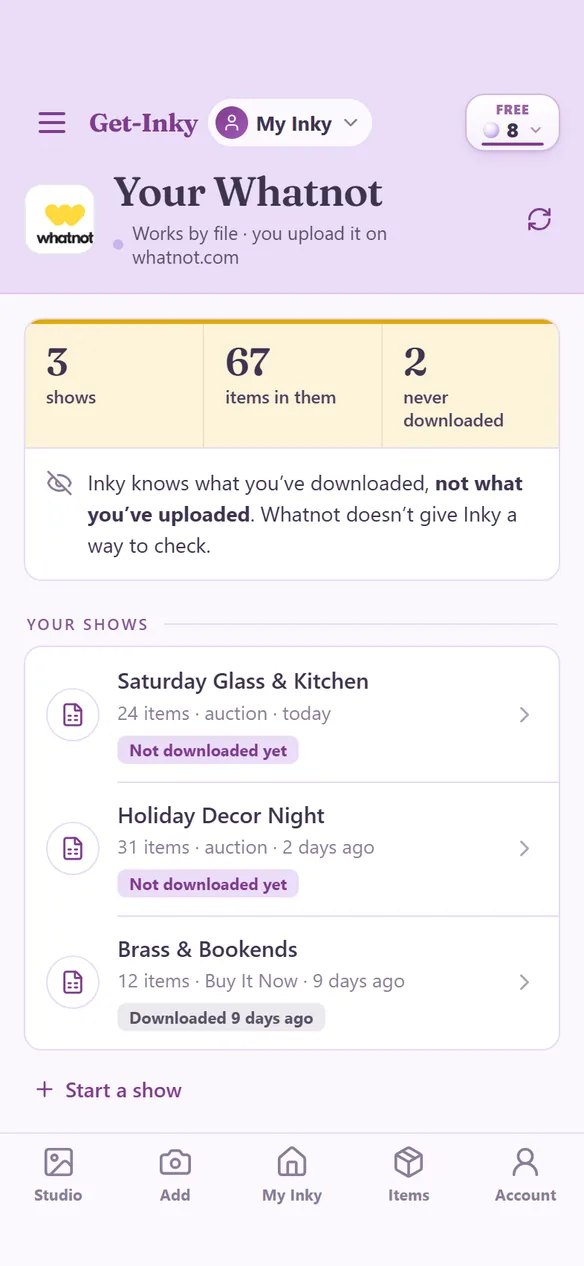
Whatnot lets you add a whole show at once from a CSV file, but filling in that spreadsheet by hand is slow. Inky builds the file from the items you photographed, already in Whatnot's layout. You upload it in Seller Hub and your drafts are waiting.
  1. Snap it. Photograph your items. Inky names each one and files it with its own SKU.
  2. Price it. Put a price on each item. A title and a price are all an item needs to go in the file.
  3. Build the show. Tick the items and choose Whatnot CSV. Set a condition, a ship size, or Auction versus Buy It Now on a whole batch at once.
  4. Upload it. Download the file and import it at whatnot.com: Seller Hub, Inventory, Import from CSV. Your items arrive as drafts.

8 free Pearls to startNo cardWorks in a phone browser

Every item gets a number viewers can call out.

Each title in the file starts with a short number, like W122. When a viewer asks about W122 mid-show, you find it in seconds. The number stays with the item for good.

Inky won't guess your condition.

An item with no condition, no ship size, or only one photo still goes in the file, with those cells left blank for you to finish on Whatnot. The condition is a claim about your goods, so it's yours to make.

Your show is saved.

The show lives in your account. Close it, switch from your phone to your computer, and come back days later with everything still there.

What it costs.

Building and downloading the file uses no Pearls. New accounts start with 8 free Pearls for the work that does use them, like cleaning photos and writing listings.

Good to know

  • Whatnot takes 48 items per upload, so a bigger show downloads as several files. Inky tells you how many before it starts.
  • Whatnot's importer won't accept cents, so prices go in as whole dollars, rounded up. Inky shows you which prices changed.
  • The upload happens in a web browser, not in the Whatnot app.
  • Upload each file once. A second upload creates duplicate drafts.
  • Inky never signs in to your Whatnot account. You upload the file yourself.

Build your file.

New to Whatnot? Read the Whatnot guide