The point-of-sale system for antique malls, vendor malls and consignment shops. Windows and Mac, online or off.
Inky Mall OS costs $99 for Core or $199 for Pro up front, then $20 a year to keep the license active. Rent your booths and take consignment on one register: rent and commission for booth renters, splits, fees and end dates for consignors, and one payout run for everyone. It keeps ringing when the Wi-Fi is down. Add Cloud+ and your vendors and consignors see their sales from home, so the “what sold?” calls stop.
The real register, mid-sale. Scan a tag and it rings.
The whole bill
Here's everything it costs.
1 · Up front
$99 Core · $199 Pro
Pick one, paid once.
2 · Yearly license
$20 a year
Keeps your register running. Starting year two.
3 · Cloud+ If you want it
$19.99/mo
Every register in sync, the Inky app connection, the card reader, and every seller checking their sales from home.
Your vendors and consignors never pay a cent to see their sales. It's part of the store's Cloud+.
Hardware: start on the computer and printer you already have. When you're ready for the counter, see the kit we recommend →
Hold that up against what you pay now.
Why we built it
One store, one register.
Plenty of stores do both: booths along the walls, consignment racks in the middle. That shouldn't mean two systems, or a spreadsheet on the side for the second one. And it shouldn't mean a monthly bill forever, or a register that stops when the internet does.
Inky Mall OS runs both on your own computer, Windows or Mac, for $99 for Core or $199 for Pro up front, then $20 a year.
— The Inky team
The counter
The Wi-Fi drops. The line keeps moving.
Scan a tag and it rings. No Enter key, no tapping around.
Take money any way they pay: cash, card, check, gift card, store credit, Venmo, Cash App, PayPal. Split one sale as many ways as you like.
Layaway with deposits, tax-exempt resale sales with the certificate on file, and returns that put the item back on the floor.
Two customers at once? Park one basket and start another.
Internet out? Every screen keeps working, and it all catches up when you're back.
Two kinds of seller
Booth renters and consignors, side by side.
Pick one when you add a seller: booth renter or consignor.
Rent only for booth renters. Agreements, fees and end dates only for consignors.
One payout run for everyone. Rent and fees each come out the right way, and nobody goes below zero.
Payouts
Month-end payouts without the calculator.
Every sale credits its seller the moment it rings: commission or the store's split off, rent and fees tracked.
Close the month in one go. Print every statement as one PDF and mark each seller paid.
A payout never goes below zero. Unpaid rent and fees carry forward. They never turn into a bill you have to chase.
Pay consignors how they like: cash, check or store credit, with a bonus for taking credit if you want one.
Rent paid by Venmo, cash or check? Record it against the booth.
Agreements & end dates
No more digging through the binder.
Set your terms once. Your consignment period, your split and your fees go on every new consignor. Different deal for one? Give them their own agreement.
Every consigned item knows its end date, from the day it goes on your floor.
See what's expiring, what's expired, and what each consignor needs to pick up.
Close each one out as returned, donated or store-owned.
A printed intake receipt with your terms on it, signed at the counter.
Markdowns, your call. Decide who takes a markdown: the consignor, the store, or both.
Your sellers
No more “what sold?” calls.
Booth renters check their booth at the counter with a PIN, and from home in the Inky app Cloud+.
Consignors check at the counter with a PIN, and from home on their own page on get-inky.com Cloud+.
One set of books. Everyone sees the same numbers your payout uses.
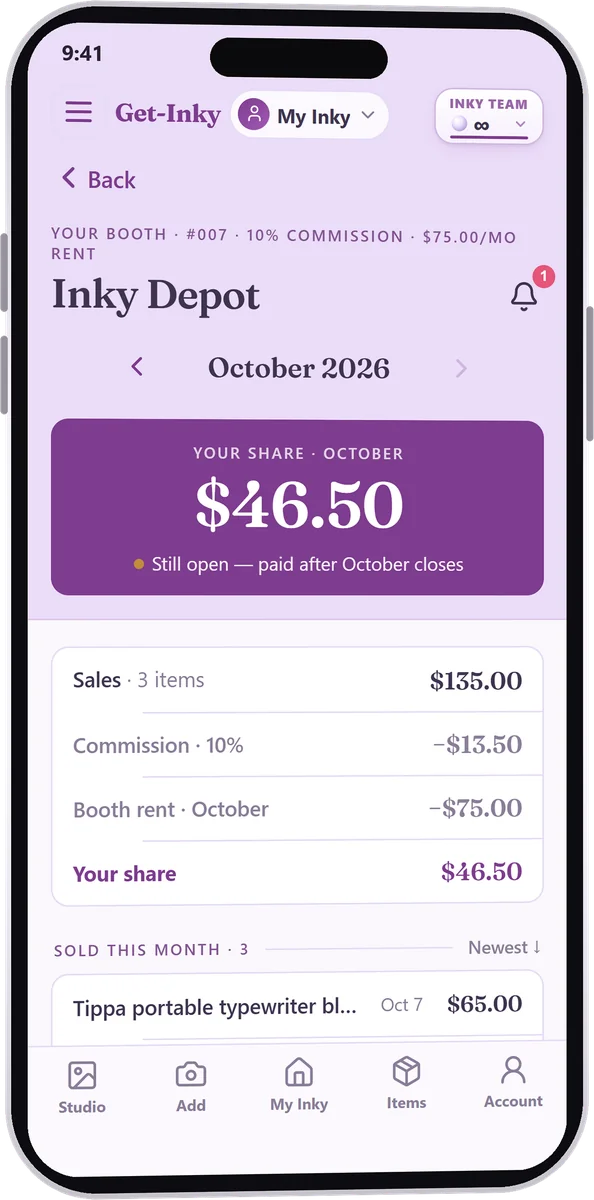
Jane's booth on her phone: sold today, commission and rent taken off, her share.Bonus · optional
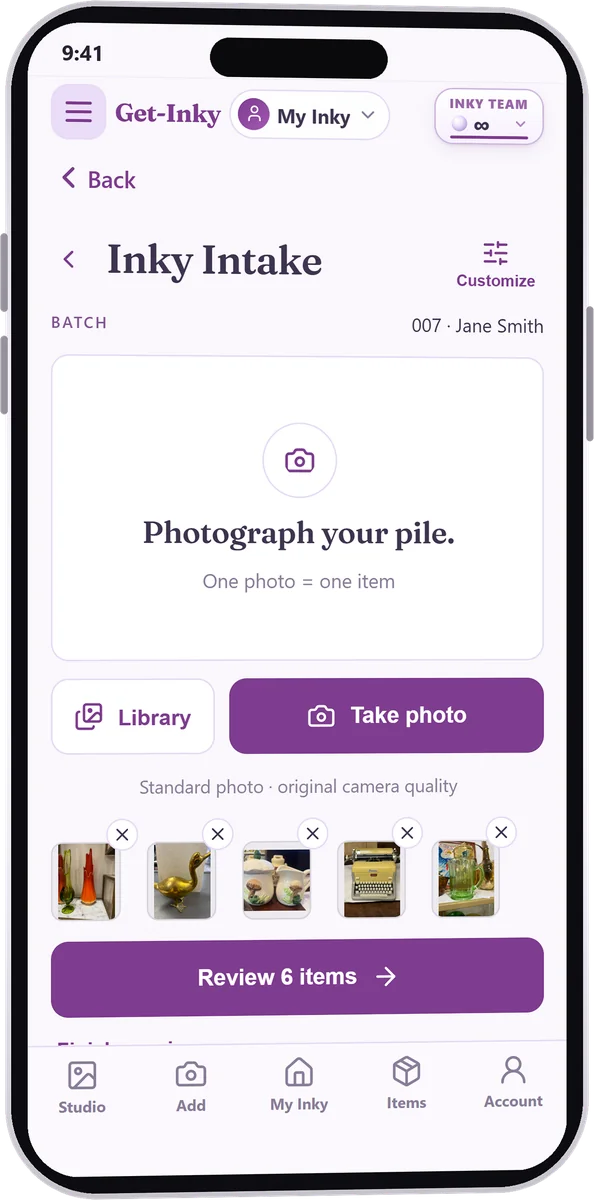
Stock the floor from a phone.
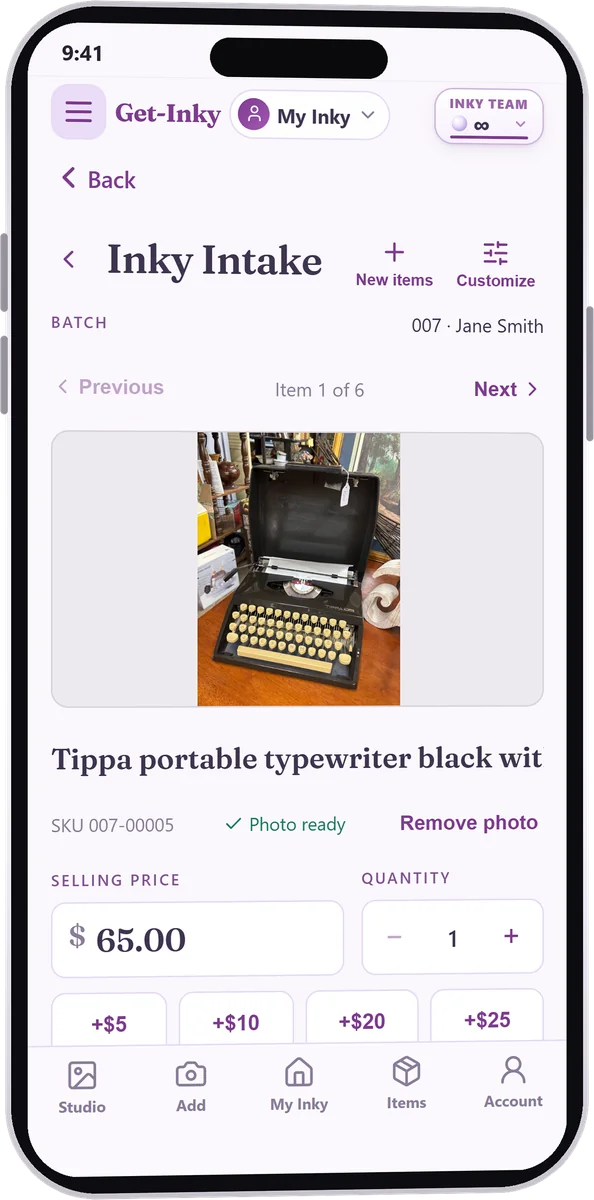
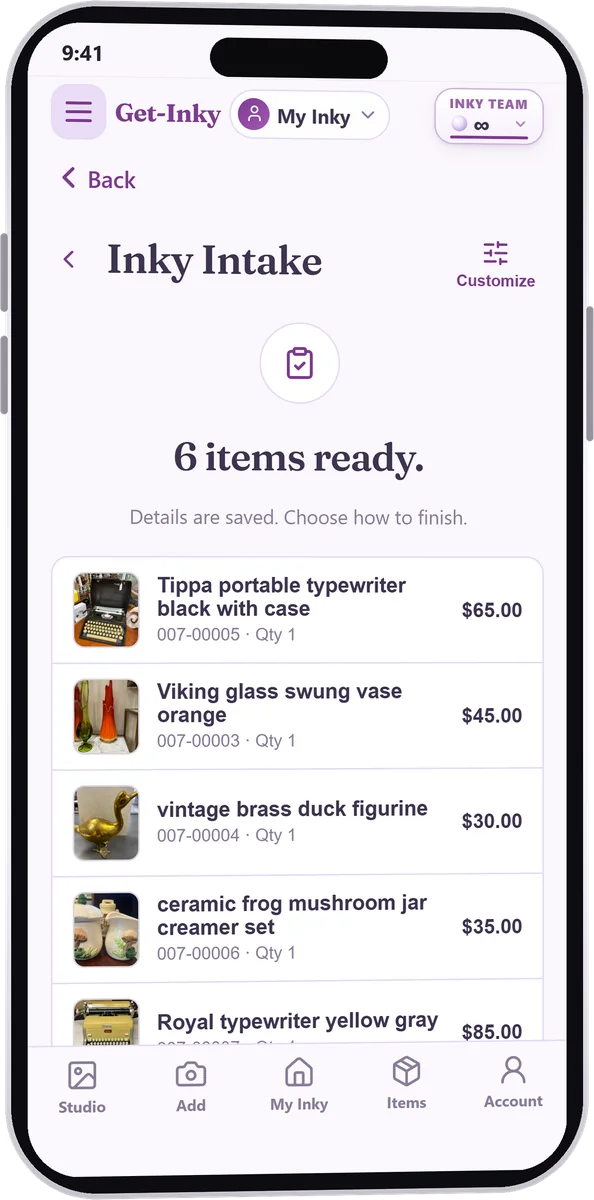
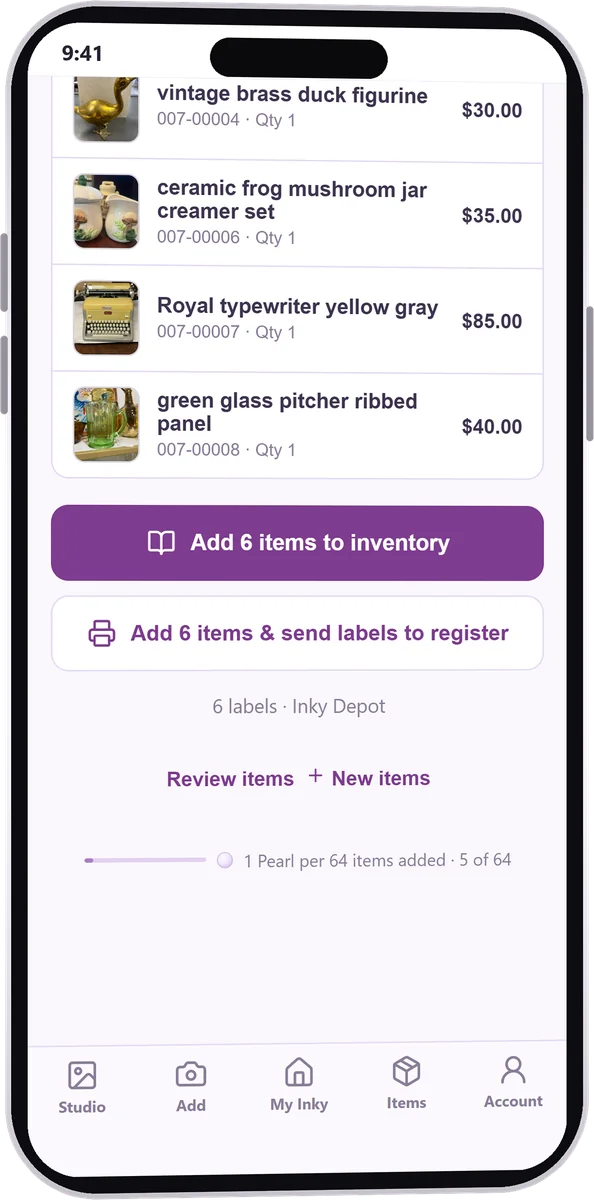
Mall OS is the register, and it's complete on its own. The Inky app works alongside it: booth renters stock their booth from their phone, and you can check in a consignor's drop-off the same way. A pile of photos becomes tagged inventory without anyone retyping it.
1 · Photograph the pile2 · Inky names each one; you set the price3 · Every item gets its SKU4 · Send the tags to the register
Swipe to see each step
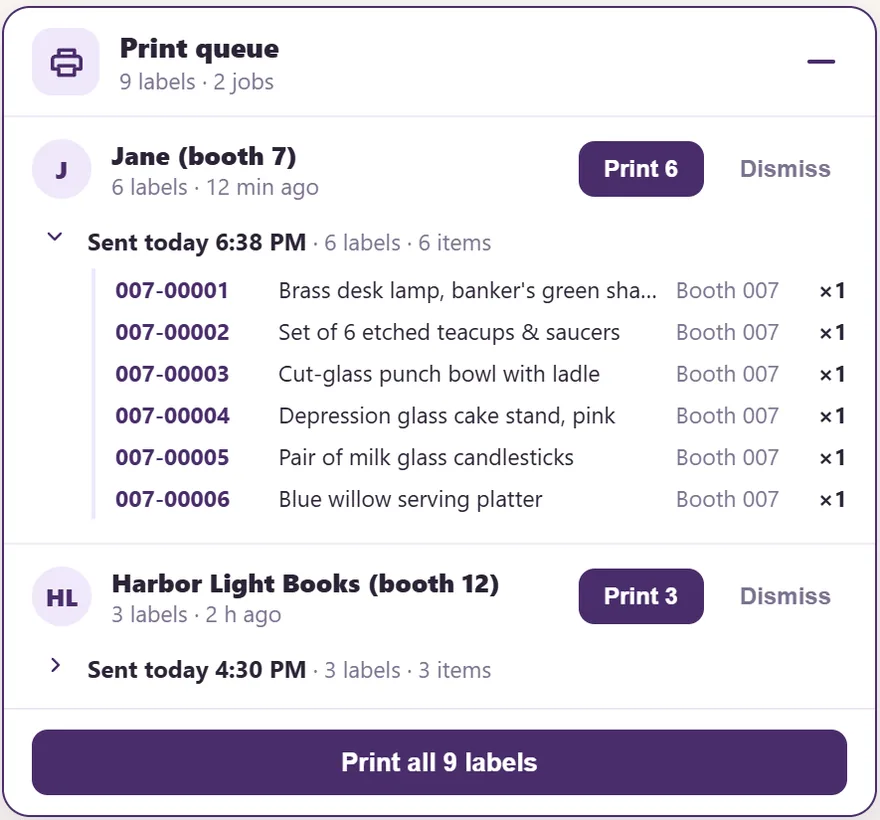
5 · At the register, the tags wait for a tap. Nothing prints on its own.
6 · The items are on your floor, ready to ring.
Stocking from home takes a little setup:
Turn on Cloud+ for the store.
Give each booth renter an invite code.
They enter it in the Inky app, and their booth is linked. Then they can stock it from home.
Not sure what to charge? The app's What's it worth? looks it up. The app connection runs on Cloud+.
Pro
Move old stock without picking up a pricing gun.
Markdowns that run themselves. Set “after 60 days, 25% off” once and the register takes it off at checkout. No re-tagging, no math at the counter.
Sales on your schedule. A store-wide or single-booth sale between two dates, or buy-two-get-one, starts and stops on its own.
Coupons you can track. Print codes on a flyer and see every one that gets used.
Rewards that bring them back. Customers earn points by phone number and spend them as store credit.
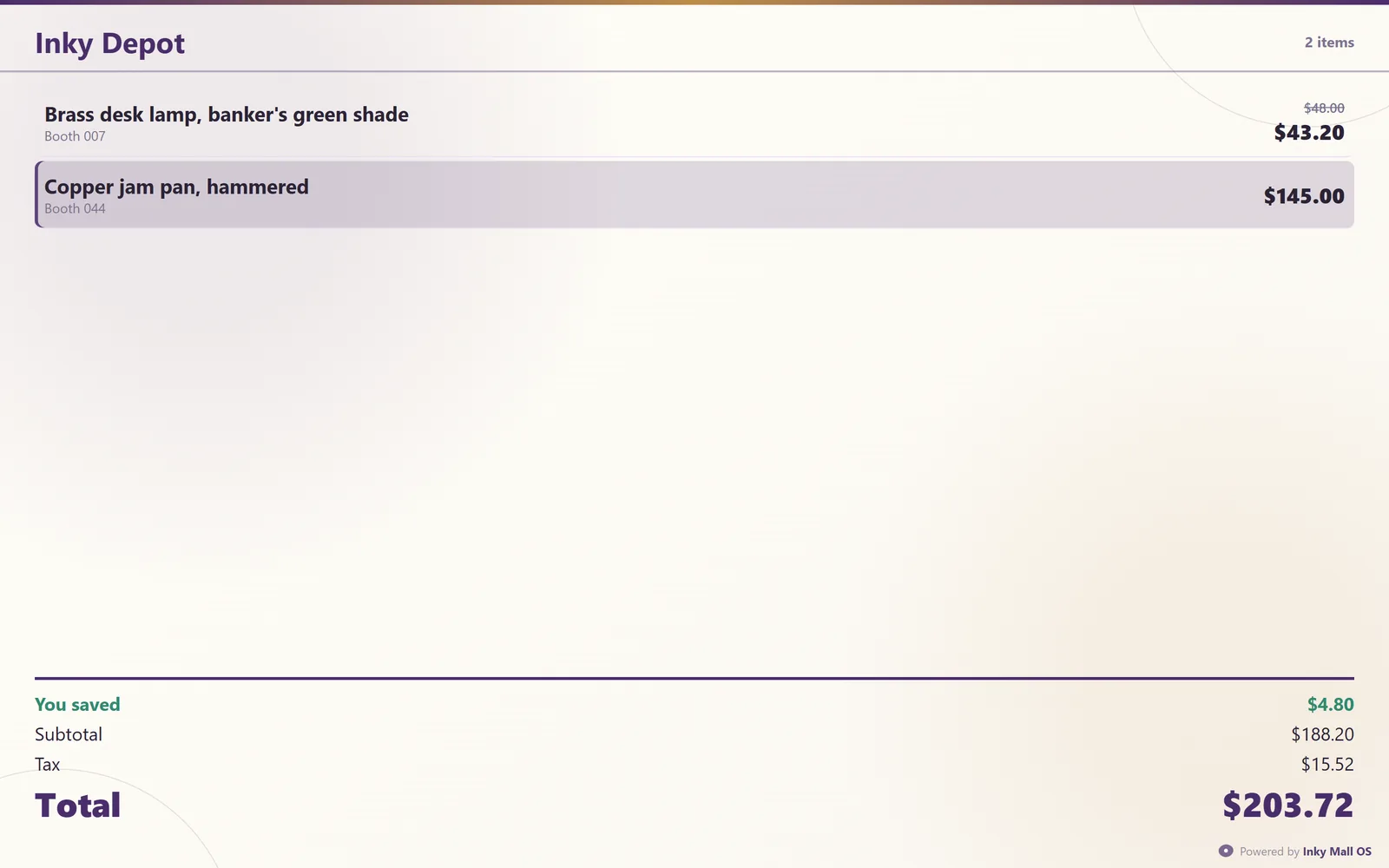
A screen that faces the customer. A second monitor shows every line as it rings, what they saved, and a QR code to pay your Venmo, Cash App or PayPal with the total filled in.
The customer display: every line, what they saved, the total.
Your numbers
See which sellers sell, and which stock just sits.
Today, this month, this year, each against last year, at a glance.
What's yours and what's theirs. Your income on its own line, never mixed in with what your sellers are owed.
What sellers owe you. Unpaid rent and fees, seller by seller.
Sales tax, ready when you file. Taxable, non-taxable and resale-exempt sales split out, with what you collected.
Dead stock, in dollarsPro. What's been sitting 90+ days, and how much money it's tying up.
Your best sellersPro. A leaderboard by sales, sell-through and how fast their stock moves.
Your busy hoursPro. A heat map of when customers actually buy, so you know when to staff.
Excel or PDF in one click for anything you need to hand over.
Switching
Switching is the scary part. We made it the easy part.
Bring your store with you.
Booths, sales history and customers come over from your old mall system's backup. Consignors and items load from a spreadsheet, with the date each agreement started.
Try it before you trust it.
30 days, every feature, no card. Run it beside your old register and see.
Your data is never held hostage.
It lives on your own computer. If the trial ends or a license lapses, nothing is deleted. Add a key and you're back where you left off.
Your sellers don't need to learn anything new.
Everyone can check at the counter with a PIN. Booth renters who want the app can use it, and consignors get their own page.
Everything in the box
The whole list
Checkout
Scan-first ringing, manual lines for untagged items
Split payments, gift cards, store credit
Layaway with deposits
Returns and voids
Tax-exempt resale sales
Optional card fee on credit only
Booths & vendors
Commission and monthly rent per booth
Payout statements, printed or PDF
Vendor PIN view at the counter
Vendor view from home Cloud+
Consignment rates
Combine booths, old tags still scan
Consignors
Store's split per consignor
Consignor numbers filled in for you
Fees taken at payout, carried over when owed
Payout by cash, check or store credit, with a bonus
One price up front, then $20 a year to keep the license active. One license covers your account.
1 · Pick your register
Core
The lean offline register.
$99
one-time + $20/yr
Scan-first checkout — split tender, gift cards, store credit, layaway
Booth and consignor payouts & printable statements
Customers, store credit & the activity log
Barcode labels & thermal receipts
Inventory with guided import from your old POS
Every feature
Pro
Every heavier feature, one low license.
$199
one-time + $20/yr
Everything in Core
Customer display with scan-to-pay
Promotions & automatic age markdowns
Store dashboard & reports that save to your computer on a schedule (daily, weekly or monthly)
Bulk edits & receipt/label designer
Weekly shift planner & branding
2 · Add Cloud+ if you want it
Cloud+
$19.99/mo
Needs Mall OS, Core or Pro
Up to 5 registers kept in sync, live
Sign in on any computer and your store loads
Every vendor and consignor sees their sales from home, free to them
The Inky app connection: stock the floor from a phone
The Square card reader, money straight to your Square account
Also from Inky: Inky Accounting. Replace QuickBooks: expenses and receipts, profit & loss on real income, and year-end tax worksheets. Not part of Mall OS. It comes with an Inky online plan, Helping Hand ($9.99/mo) and up. See online plans
Nothing changes at the counter. Mall OS runs on your own computer, so sales, receipts, discounts, gift cards and layaways all keep working. The only things that wait for the internet are syncing between registers and the Square card reader. They catch up on their own when you're back.
Do I need new hardware?
No. It runs on Windows or Mac, and an older computer is fine. Add a barcode scanner, a label printer, a receipt printer and a cash drawer if you want them. Without a label printer, tags print on sheet labels from any printer.
Yes. Booths, sales history and customers come over from your old mall system's backup. Consignors and items load from a spreadsheet, with the date each agreement started.
Do I have to use the Inky app?
No. Mall OS is a complete register on its own. Add items at the register or load them from a spreadsheet, and bring your booths and sales history over from your old system. The Inky app is a bonus for vendors who want to see and manage their booth in real time, and stock it from their phone. If your vendors want to stock their booth from home, it takes a little setup: Cloud+ for the store, and an invite code for each vendor.
Do consignors get emails or texts?
No. Each consignor logs in to their own page to see their sales, what's on your floor, what's expiring and what they're owed. Nothing for you to send.
What happens when an item's time is up?
It shows on your expiring list, then expired. Put it on the consignor's pickup list, or close it out as donated or store-owned.
What happens after the free trial?
The register locks until you add a license. Nothing is deleted. Paste your key and you're back exactly where you left off.
What if I don't pay the $20 a year?
You get 30 days of reminders while everything keeps running. After that the register locks, with every bit of your data safe. Renew and it opens again instantly.
Does my money go through Inky?
No. Cash, checks and wallet payments go straight to you, and the Square card reader pays into your own Square account. Inky records the sale. It never holds your money.
Can I take credit cards?
Yes. With Cloud+, pair a Square card reader to each register and the money lands in your Square account. Already have a card machine? Ring the sale as "Card" and keep using it.
How many registers can I run?
Up to 5 on one account. With Cloud+ they stay in step live: ring a sale on one and the others update.
Do my vendors and consignors pay anything?
No. Everyone checks at the counter with a PIN, and from home with the store's Cloud+. Nobody pays to see their sales.
Who owns my data?
You do. Your whole store is one file on your computer. If you use OneDrive, it's backed up there automatically. With Cloud+, a new computer is a sign-in away.
What if my computer dies?
With Cloud+, install Inky on the new computer, sign in, and your store loads. It takes about ten minutes. Without Cloud+, your store file is waiting in OneDrive if you use it.
Is it hard to learn?
If you can ring a sale, you can run it. A full searchable manual is built in, and real people answer at [email protected].
 Get-Inky