
19 · Licensing & plans
On this page
What the editions are, what they cost, how a register is activated, and — the part that matters most — what happens when something lapses. The short answer to that last one: your data is never touched. A lapsed register locks its screen; a key or a sign-in unlocks it instantly, exactly where you left off.
The editions
| What it is | Price | |
|---|---|---|
| Trial | Everything, for 30 days from the first launch of a new install. | Free |
| Core | The register, Items, Sales, Financials, Payouts, Vendor Management, Cash & Credit, Staff, label printing — a complete mall register. | $99 once + $20 a year |
| Pro | Core plus the heavy extras: customer display, promotions, coupons, rewards and markdowns, branding and the designers, reports that save to your computer on a schedule (daily, weekly or monthly), bulk actions, Insights and the report builder, manager access, the schedule, more than one location. | See get-inky.com |
| Inky Cloud+ | Anything that touches the internet: registers that sync, your store on any computer, vendors who see their sales live on get-inky.com, the Square card reader. | $19.99 a month |
| Inky Accounting | The bookkeeping suite under Financials — expenses, Profit & Loss, recurring bills, budgets, year-end worksheets. | Comes with your Inky plan; the Settings card says if your account needs it added |
Core and Pro are licences for this computer: a key you paste in once. Cloud+ and Accounting belong to your Inky account, and reach the register when it signs in.
The trial

- The trial bar sits above the register for the 30 days of a new install, counting down. Everything works while it's there.
- Buy Core — $99 opens get-inky.com. Once a licence is active, the bar is gone for good.
The trial clock starts at the first launch and can't be reset by winding the computer's clock back. On day 31 the register locks — the data is untouched, and a key unlocks it.
Activating a licence
Open the ⋯ menu in the top bar and click Plan.
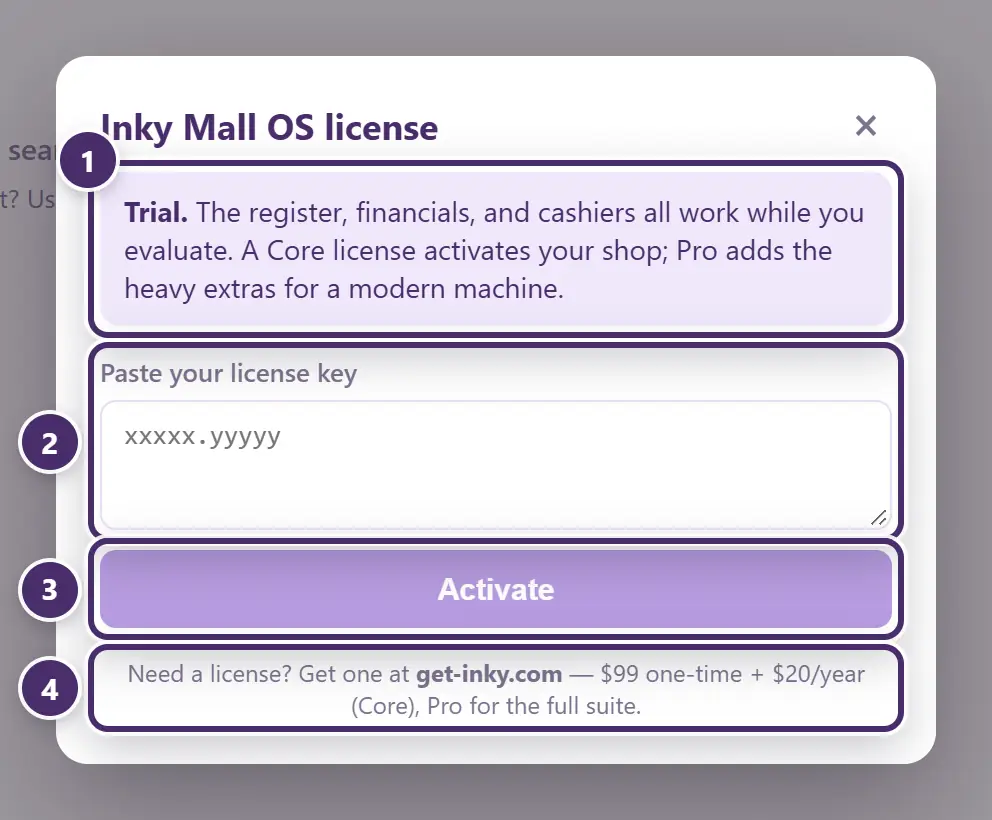
- Where this register stands — on trial here. The same box says Core, Pro — active, Pro — renewal due or Pro — expired, with the dates, once there's a licence.
- Paste the key from your get-inky.com account. A key is a long block of text — paste the whole thing.
- Activate. Instant, and offline is fine: the key is checked on this computer, not over the internet.
- Where to get one, and what it costs.
If your Inky account includes Mall OS, each register still needs its own access key: generate one per register at get-inky.com (up to five at a time) and paste it here. A register that is entitled through the account but has no key yet opens to an Enter your access key screen with a Get my keys button that takes you to the right page.
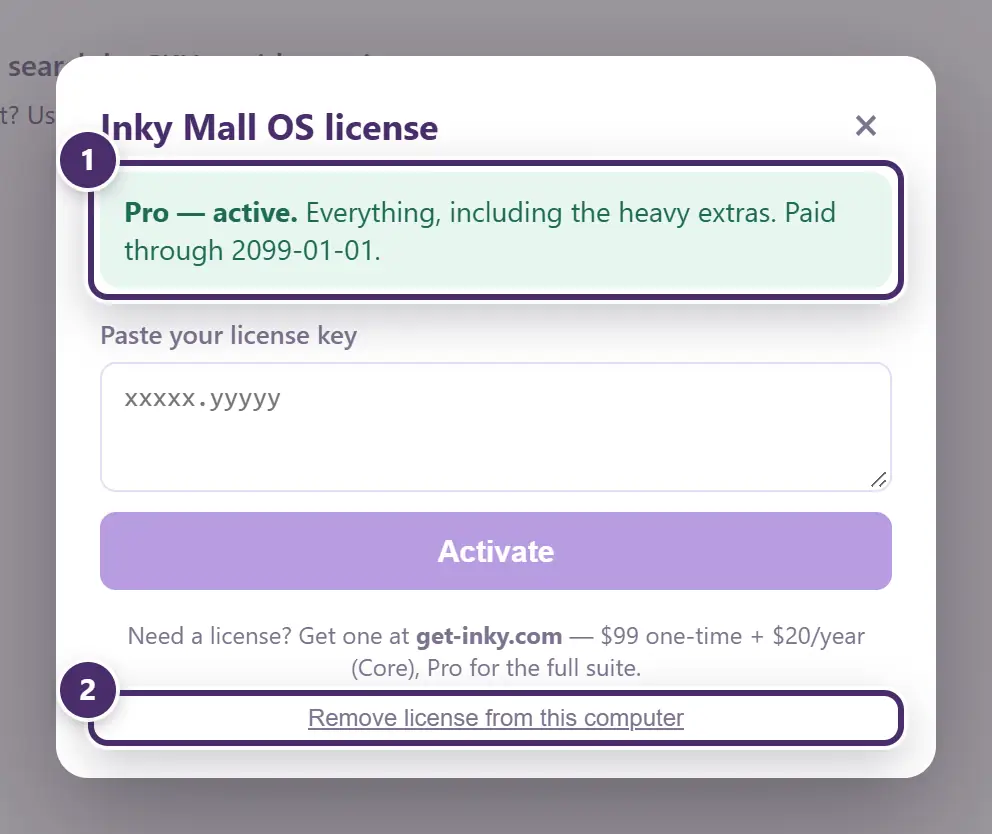
- Pro — active, and the date it's paid through. Inside the last 45 days it also says how many days are left.
- Remove license from this computer — for moving a licence to a new computer. The data stays; only the key goes.
Renewals
A paid key is good for a year. Renewals reach the register by themselves: when you renew at get-inky.com, the register picks up the new paid-through date the next time it checks — at launch, every few hours, and whenever the machine comes back online. There is nothing to re-paste.
If a year runs out without a renewal:
- For 30 days everything keeps working, and a bar counts down — License lapsed — this register locks in N days. The licence window says Pro — renewal due.
- After that the register locks to a single screen: This register is locked. It says, in bold, that every byte of data is safe — and it is. Renew, paste a key, or sign in to an Inky account that has Mall OS, and the register opens instantly, right where it stopped.
Nothing is deleted, hidden, or degraded at any point. A locked register is a register waiting for a key.
Which register has which plan
The ⋯ menu shows the plan on this register at a glance, and the licence window shows the dates. On the Settings tab, each group's header says whether it's live on this register — Pro, Cloud+, Accounting — or carries a button to get it. Plans are described in one place, get-inky.com/mall-os, and that page is what the buttons open.
When the internet is out
Activating a key, ringing sales, everything in Core and Pro — all local. A register never locks because it's offline: the licence window is measured in days, not connections, and the trial and grace periods are long enough that a week without internet changes nothing. Renewal pick-up and Cloud+ simply wait for the connection.
Guide for Inky Mall OS 0.16.0, updated Nov 20, 2026 · Download the whole guide (PDF)