
9 · Cash & Credit
On this page
Everything about money that isn't a sale lives on the Cash & Credit tab: what the shop owes its customers, the cash drawer, wallet payments still to check, gift cards, store credit, open layaways, and the customer cards. It sits behind the owner's PIN.
What you are looking at
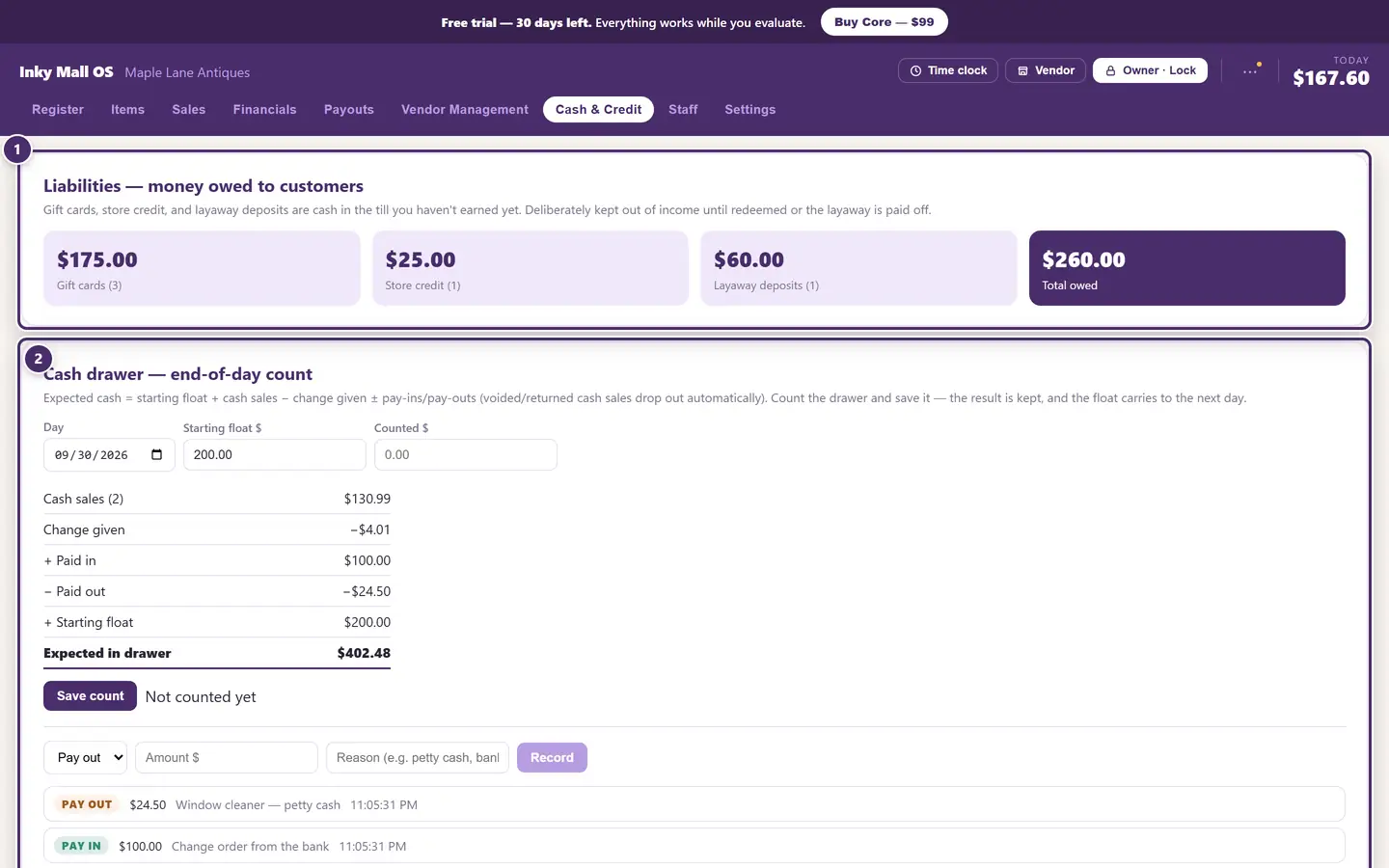
- What the shop owes its customers — gift cards, store credit and layaway deposits, and the total.
- The cash drawer, counted at the end of the day. Below it, in order: wallet payments still to check, gift cards, customers & store credit, open layaways, and the customer cards.
Money owed to customers
Gift cards, store credit and layaway deposits are cash in the till you haven't earned yet. Inky deliberately keeps them out of income until the card is spent, the credit is used, or the layaway is paid off — so a good gift-card December never looks like a good sales December.

- Gift cards still carrying a balance, and how many.
- Store credit on customers' accounts, and how many customers hold some.
- Layaway deposits taken on layaways that aren't paid off yet.
- The total — cash that has come through the till but is not the shop's yet.
Counting the drawer
Do this at the end of every day, or every shift. Inky works out what should be in the drawer; you tell it what is.
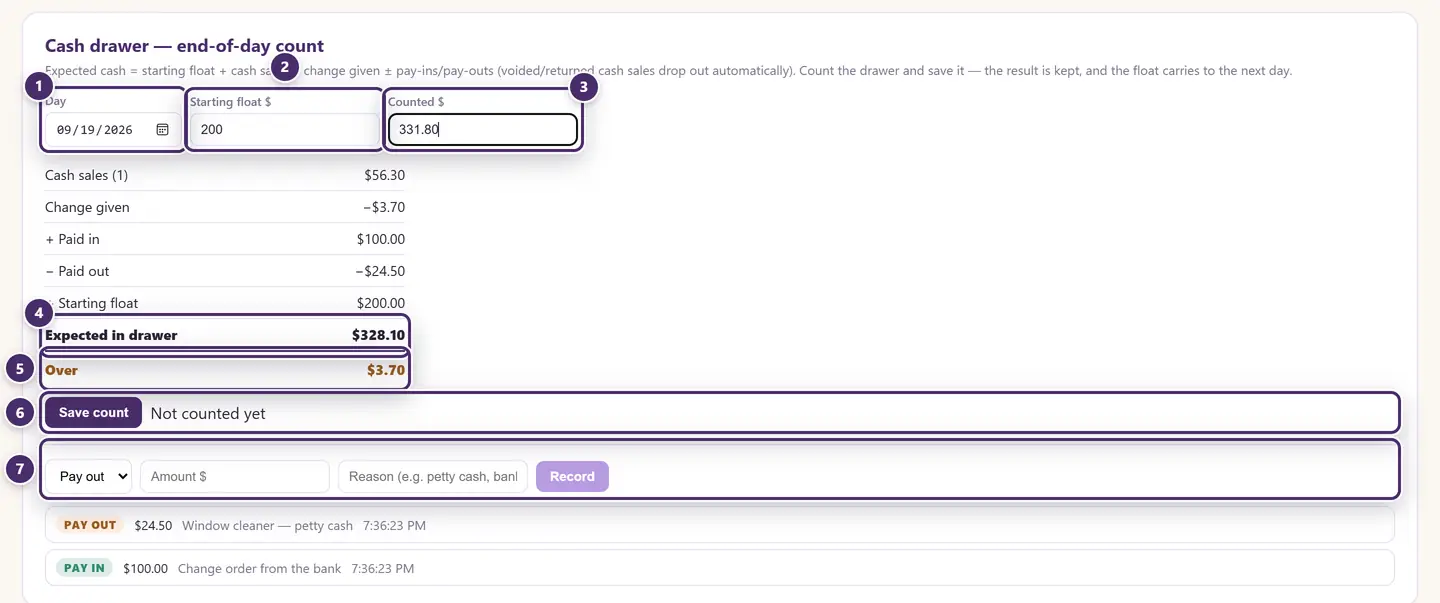
- Which day. Today, unless you're catching up.
- Starting float — what was in the drawer when the day began. It carries over from the last count you saved.
- Counted — what's in the drawer now.
- What should be there: the float, plus cash sales, minus change given, plus pay-ins, minus pay-outs. A voided cash sale drops out by itself.
- Over, short, or balanced.
- Save count. The result is kept with the time it was counted; count again later and it updates. A count made on the web (Cloud+) shows up here too.
- Pay in / pay out. Money that moved without a sale — a bank drop, petty cash, a change order from the bank. Say why; it shows in the list underneath and in the expected total.
Only cash sales count here. Cards, checks and wallets never touch the drawer.
Wallet payments still to check
Inky can't see Venmo, Cash App or PayPal payments — they go straight to your own accounts. So when a sale is rung on one of those tenders and nobody confirmed the money arrived (see Taking payment), it waits here.

- Which day, and how much on it is unconfirmed.
- Each unconfirmed payment, with the time and who rang it. Open the app on your phone, find the payment, then tap I checked — it arrived. What stays here is what to chase if the day is short.
Gift cards
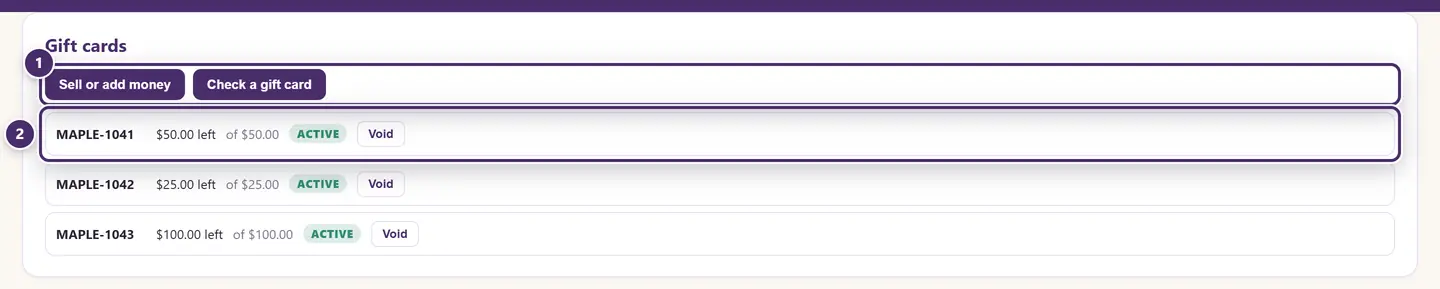
- Sell or add money to a card, or Check a gift card — the same dialogs as the register's buttons.
- Every card: what's left on it against everything ever loaded onto it, and its status. Void kills a lost or stolen card — its balance comes off the shop's liabilities.
No sales tax is charged when a card is sold; the tax is rung on whatever it's eventually spent on. Cash taken for a gift card counts in the drawer, as a paid-in.
Square gift cards (when they're on) aren't in this list — their balances stay in Square. What the shop owes its customers adds a Square gift cards figure, the live total from Square, or says it couldn't reach Square. A Square card being sold or reloaded that Square hasn't finished shows under Gift card loads waiting until it does.
Store credit
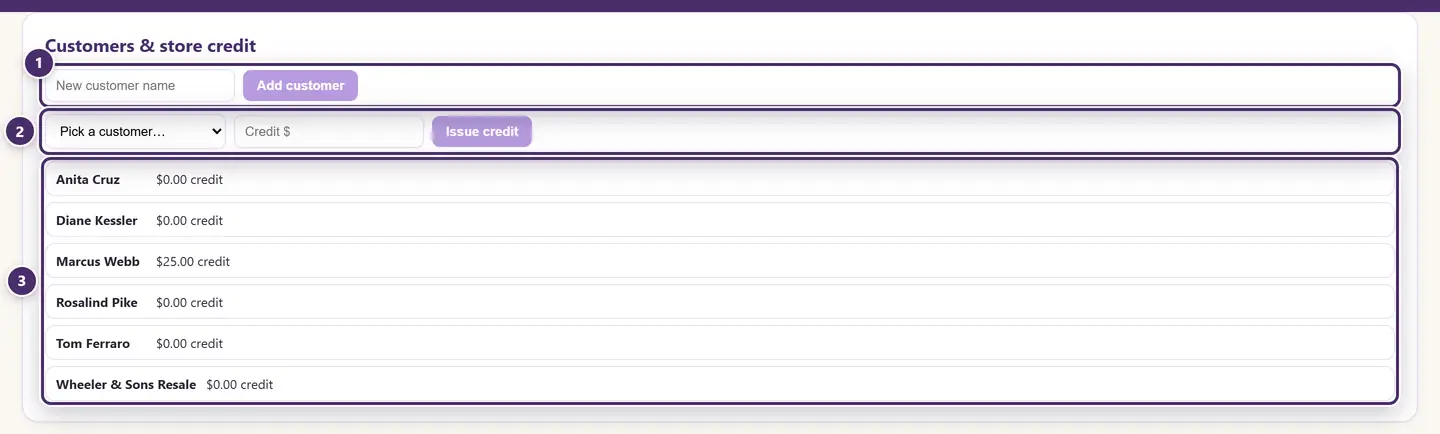
- A new customer, by name only — the full card is further down the page.
- Issue credit to a customer: a return without a receipt, a goodwill gesture, the deposits from a cancelled layaway.
- Who holds what. Credit is spent at the register with the Store credit tender, which caps itself at the balance.
Open layaways
A layaway is started at the register (Put on layaway); it is looked after here.

- Whose it is, and how many items are held.
- Paid so far, the total, and what's still due.
- Take another deposit. Type the amount and tap Deposit.
- Complete. The remaining balance is taken in cash, a receipt is produced, and the items are theirs. This is the moment the sale is recorded as income — until now the deposits were a liability.
- Cancel. The items go back on the floor at their tag price. The deposits already paid become store credit for the customer — or are refunded in cash if the layaway had no customer attached.
The items stayed off the floor at the price on the day the layaway was started; a price change since then doesn't move the deal.
Customers
The customer card is where regulars live: contact details, purchase history, lifetime spend, store credit, and whether they buy for resale.
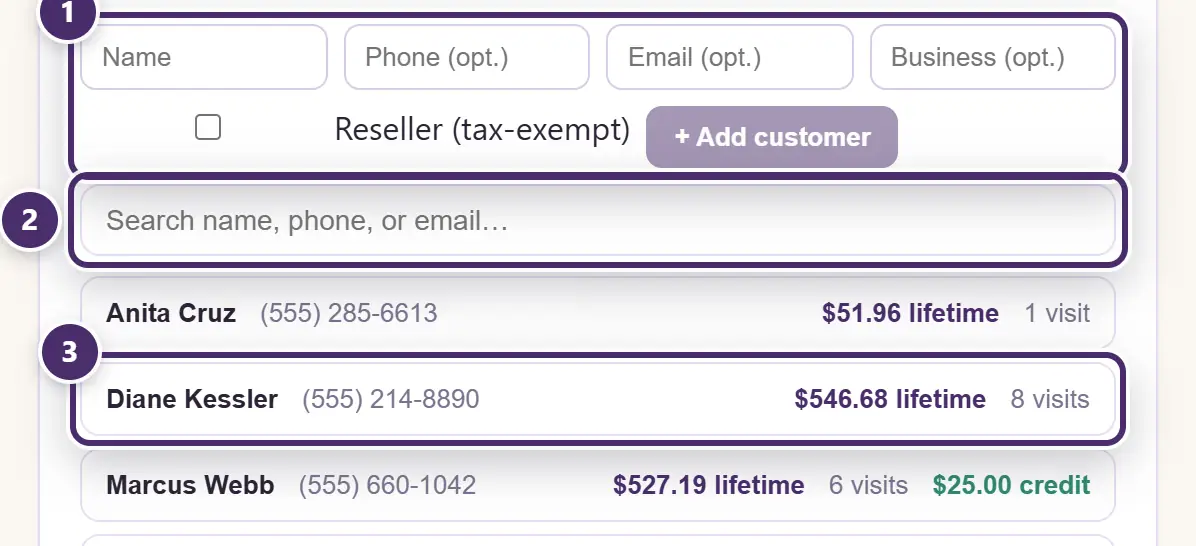
- Add a customer with their contact details. Tick Reseller for a buyer with a resale certificate, and give the certificate number — their sales ring tax-exempt automatically from then on.
- Search by name, phone or email.
- One line per customer: lifetime spend, how many visits, and any store credit. Click the line to open the card.
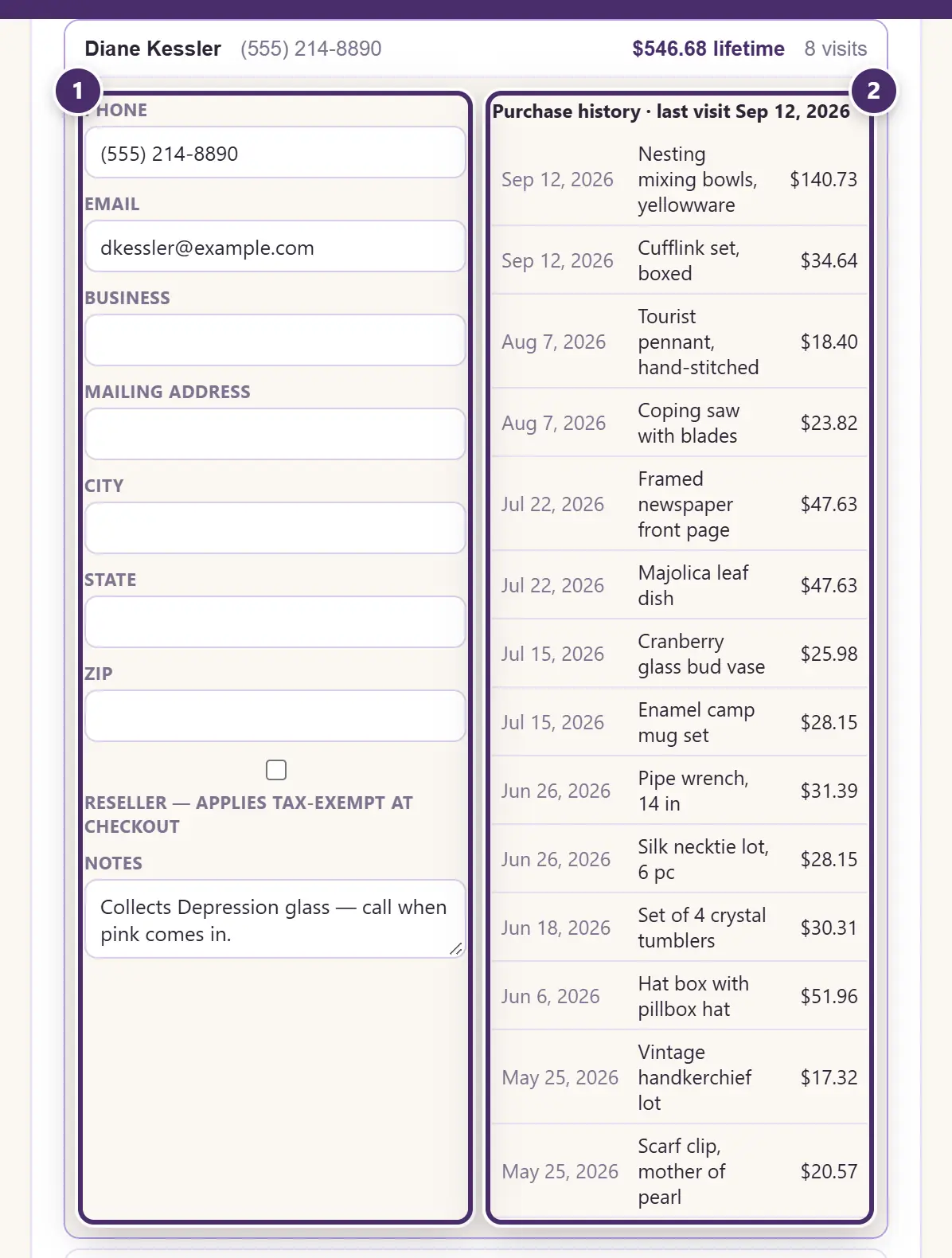
- Contact, address, reseller status and notes. Each box saves the moment you leave it. The notes are yours — collects Depression glass, call when pink comes in.
- Purchase history — every sale attached to this customer at checkout, newest first, with the last visit at the top.
A customer is attached to a sale in the Take payment window; that is what builds the history and the lifetime figure. A rewards member is a customer too — the points program is in Promotions, coupons & rewards.
When the internet is out
All of it works offline: counts, pay-outs, gift cards, credit, layaways, customer cards. On a Cloud+ shop it all syncs to your other tills and to get-inky.com when you're back.
Guide for Inky Mall OS 0.16.0, updated Nov 20, 2026 · Download the whole guide (PDF)