
10 · Promotions, coupons & rewards
On this page
Five ways to take money off, each with its own job:
| What it is | Who turns it on | |
|---|---|---|
| Promotion | A percentage off the whole store or one booth, between two dates. Applies itself at the register. | You, in Settings, ahead of time |
| Quantity deal | Buy two, get one free — on one SKU, any items from a booth, or the whole store. Applies itself. | You, in Settings |
| Automatic markdown | A percentage off anything that has sat on the floor longer than N days. Applies itself. | You, once — it then runs forever |
| Coupon code | A code the customer presents — typed or scanned off a flyer. Tracked per use, capped if you like. | The customer, at the register |
| Rewards | Points earned by phone number, cashed in as store credit. | The customer opts in; the shop opts in first |
All five are Inky Mall OS Pro features, and every one of them lives on the Settings tab. The manual discounts a cashier types at the register — a percentage off a line or the whole ticket — are in The register.
Who pays for a discount
This is the part that matters to a mall, so it comes first.
A promotion, a quantity deal, a markdown, a coupon, or a discount typed at the register all reduce the selling price of the line. The booth's commission is worked out on what the item actually sold for, so the booth bears the discount, exactly as it always has when a dealer marks something down at the counter. Payout statements show what each discount cost the booth — see Payouts.
A rewards redemption is different. It arrives as store credit, and store credit is the shop's money. The shop funds the reward; the booth is paid in full.
How they combine. Where a promotion and a markdown both apply to the same item, the customer gets whichever is larger — those two never stack. A discount the cashier types applies on top of that; a quantity deal is worked out on the price after all of those; and a coupon comes last, on what's left.
The switches
Every Pro feature has a master switch at the top of the Settings tab.
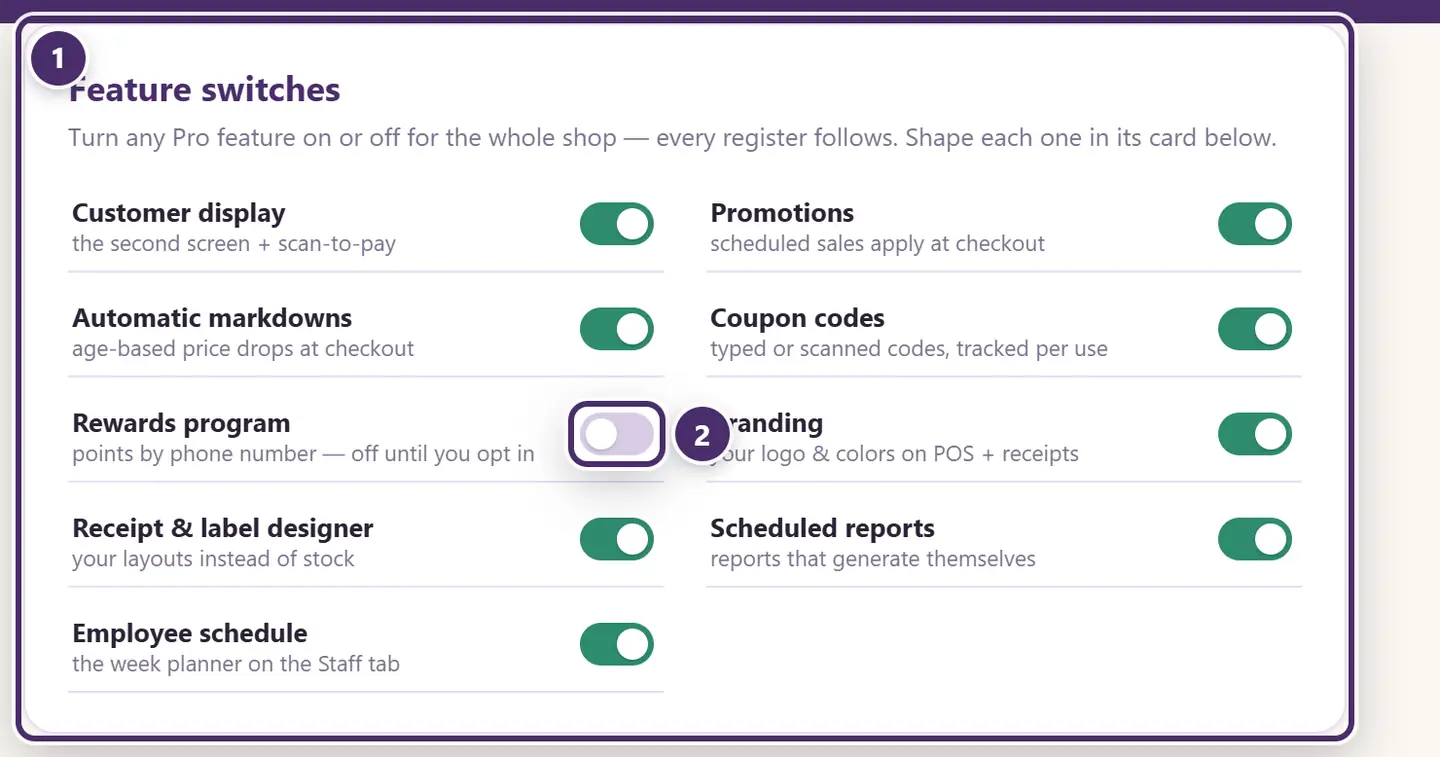
- One switch per Pro feature. Off means off everywhere: the register stops applying promotions and markdowns, the coupon box disappears, and the card below goes quiet. Every register in the shop follows.
- Rewards is the one that ships off. A points program accrues a liability the moment it earns, so a shop has to opt in.
Scheduled promotions
Anniversary weekend, 10% off everything. Tool Week, 15% off booth 65. Set it up once; the register applies it while it's live and stops when it's over. Nothing to remember at the counter, nothing to re-tag.
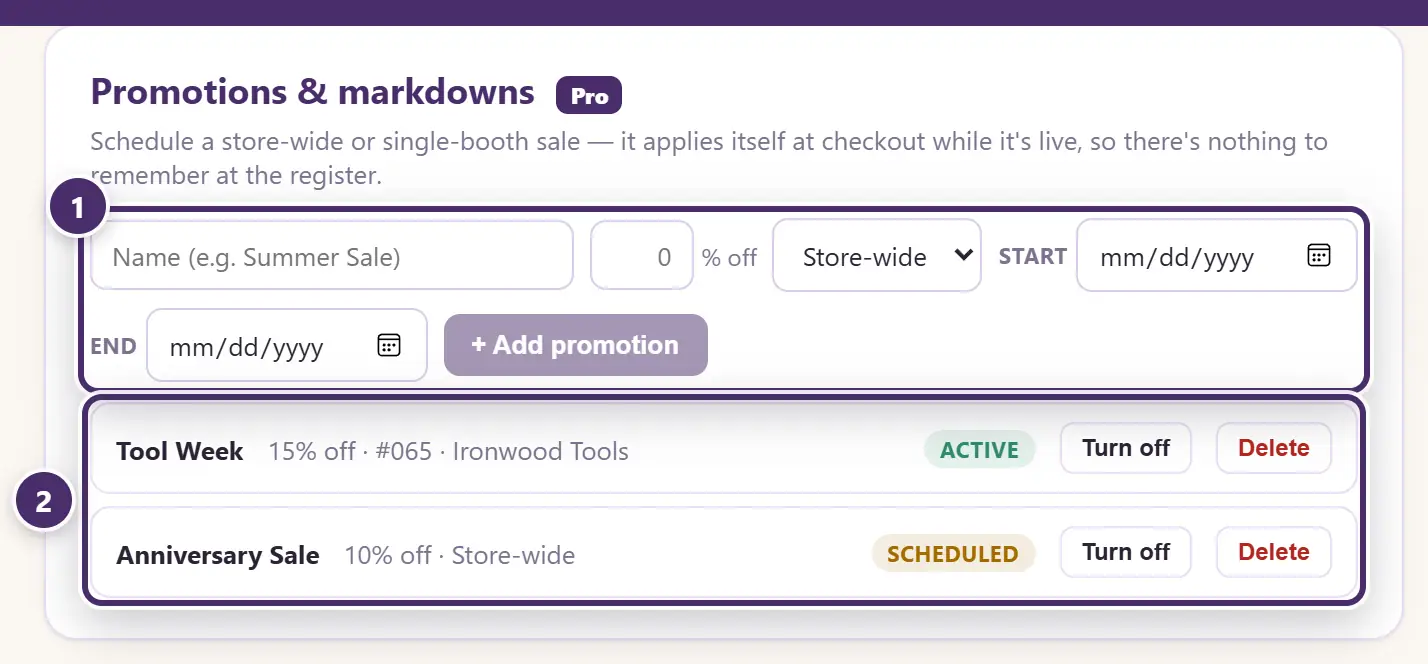
- Schedule one: a name, the percentage, the whole store or one booth, and the dates.
- Every promotion, live, waiting, or over. Turn off pauses one early; Delete removes it.
At the register, a line the promotion applies to says so:

- The badge names the promotion that applied itself to this line.
- The price already reflects it — the tag price struck through, the sale price beside it.
The receipt prints the line at its tag price with the percentage off beside it, so the deal is on the paper; the booth's statement shows what the discounts cost the booth.
Quantity deals
Buy two candles, get the third free. Any three from booth 12, the cheapest one half off. Storewide, buy one get one. Set the deal up once and the register does the rest: it sees the units on the ticket, applies the deal, shows it on the line, and prints it on the receipt by name.
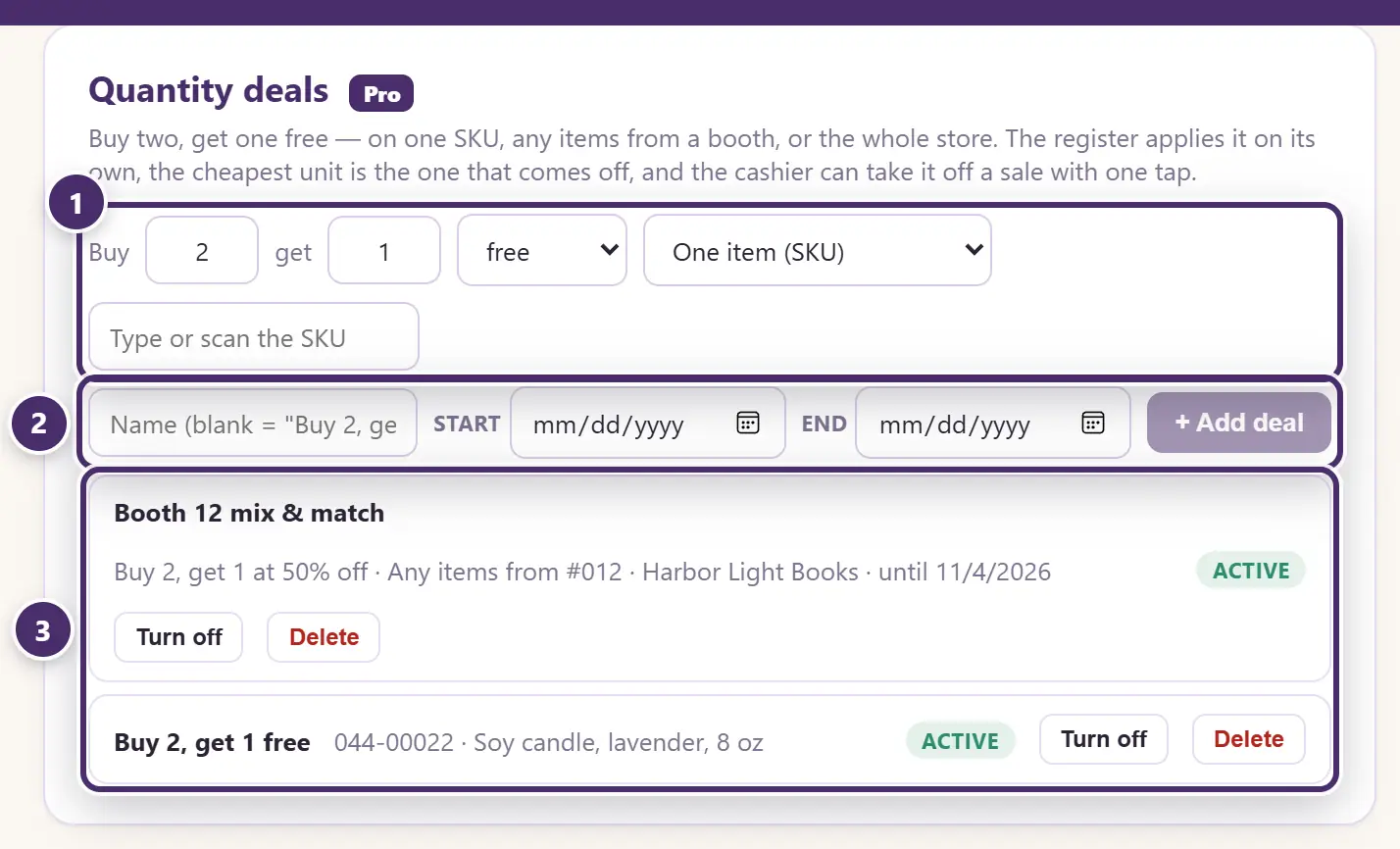
- The deal in numbers: buy this many, get this many — free, or at a percentage off — and what it's on: one item (type or scan the SKU), any items from a booth (mix-and-match), or any items in the store.
- A name and dates are optional. Leave the name blank and it names itself from the numbers — Buy 2, get 1 free — which is what the receipt prints. No dates means until you turn it off.
- Every deal, live or scheduled or over. Turn off pauses one; Delete removes it.
The rules, so the numbers never surprise anyone:
- It repeats. Buy 2, get 1 free on seven candles gives two free; the seventh rings at full price. Not enough units for a full group, no deal.
- The cheapest units are the free (or discounted) ones — across everything on the ticket the deal covers, at whatever those units are ringing for. Three items from the booth at $48, $22 and $6: the $6 one comes off.
- It works on the net price. A candle that's already 10% off in a promotion is free at its promotion price; a coupon is figured after the deal.
- One unit, one deal. An item on its own deal doesn't count toward its booth's deal, and a booth's items don't count toward a storewide one. The more specific deal wins.
- Tagged items only. Manual lines and layaways don't take part.
- Two deals can't overlap on the same target. The card refuses a second live deal on the same SKU, booth, or the store while the first one's dates are running — end the first, or give the second dates of its own.
- The booth bears it, like a promotion — see Who pays for a discount above.
Quantity deals follow the Promotions switch in Feature switches: off there, off here.
At the register

- The badge names the deal and what it took off this line — the cheapest unit, at whatever it was ringing for.
- Three units, one free: the tag total struck through, the sale total beside it.
The cashier doesn't do anything — the moment the units are on the ticket, the deal is on it. But a deal that was left on, or one that shouldn't count for this customer, can come off the sale in one tap:
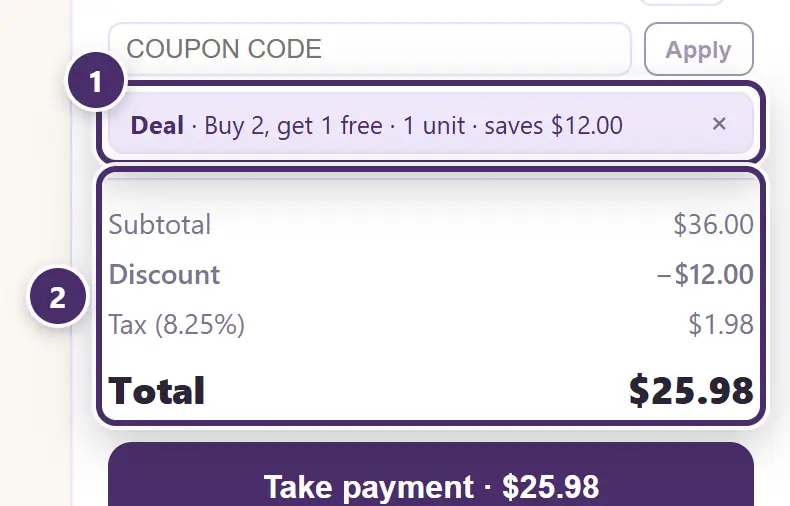
- The deal chip, where the ticket discount and the coupon live. × takes the deal off this one sale — the next sale gets it again. Put back undoes that. A deal taken off is noted in the activity log, with who did it and what it would have saved.
- The totals with the deal in.
On the receipt the line prints as 3 @ $12.00 −33.33% with Buy 2, get 1 free under it, so the customer sees the deal, not just a rate.
Automatic markdowns
After 60 days, 25% off. A tier applies to anything that has been on the floor that long — store-wide, or for one booth, and optionally only to consignment items. Stale stock keeps moving without anyone re-tagging it.
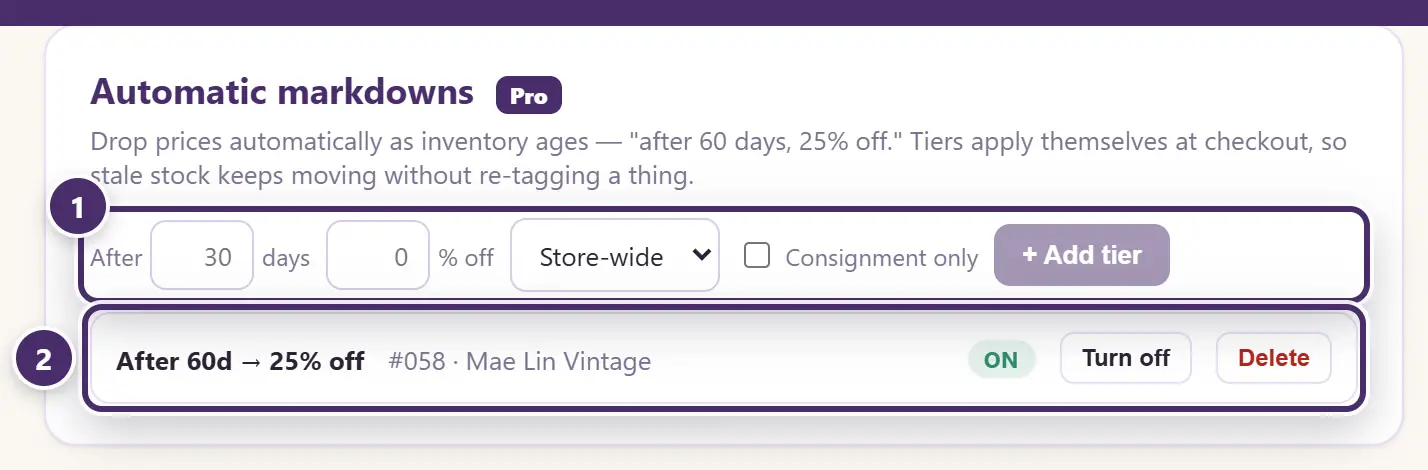
- A tier: after this many days, this much off, for whom.
- The tiers in force. An item takes the deepest tier it has aged into. Turn off pauses a tier; Delete removes it.
"Days on the floor" counts from when the item was added to Inky — so a booth's whole history is eligible from day one of an import, and a vendor who restocks resets the clock on the new items only.
Coupon codes
A coupon is a code: on a flyer, a postcard, a printed handout, a sign at the door. The customer presents it, the cashier types or scans it, and Inky tracks every use.
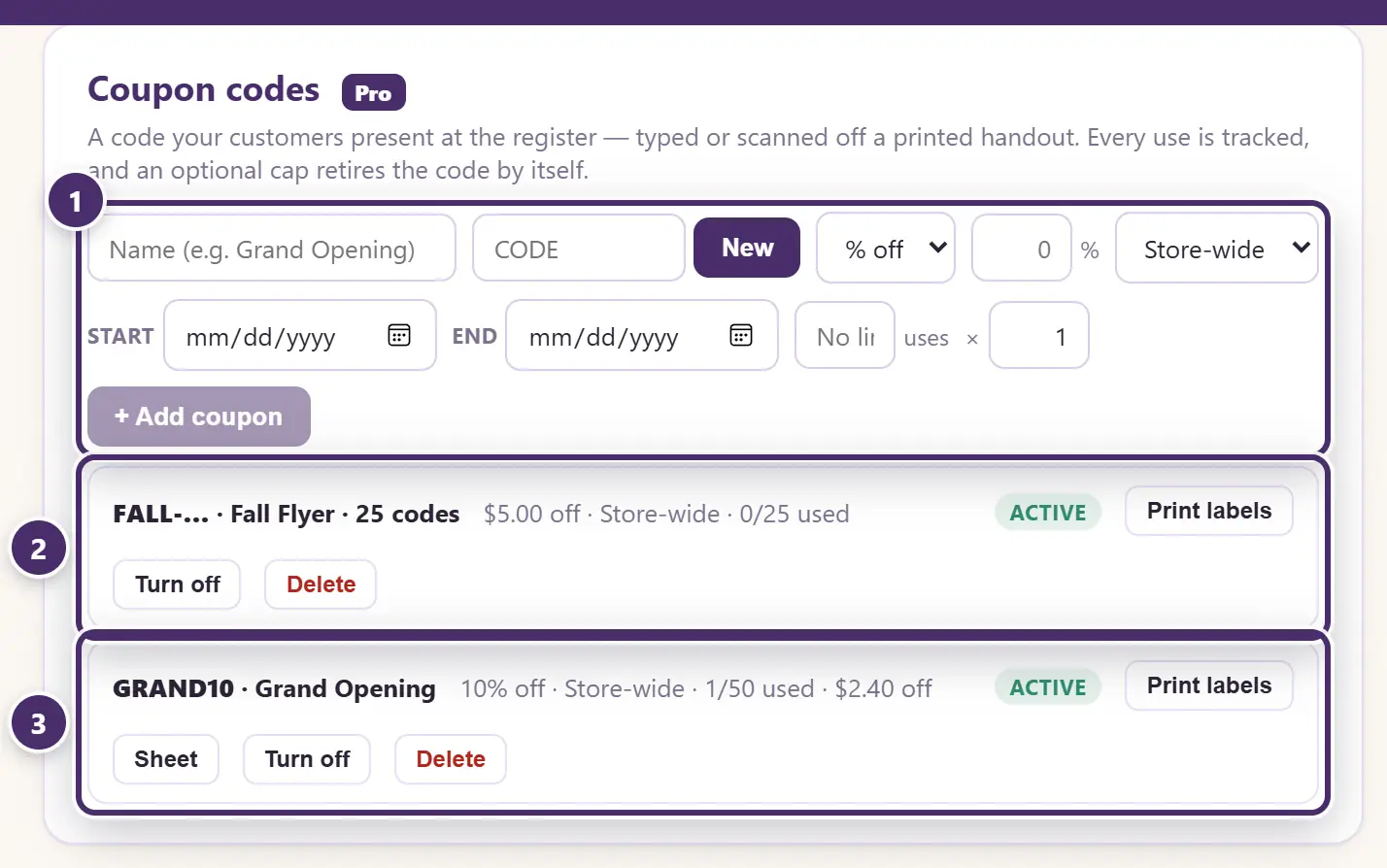
- Issue a coupon: a name, the code (or let Inky make one up with New), percent or dollars off, the whole store or one booth, optional dates, and a cap on how many times it can be used. Set How many coupons above 1 and Inky mints that many unique codes in one go — one per flyer, each good on its own terms.
- A batch of unique codes, tracked as one campaign: how many have been used, and the buttons to print the whole batch as barcode labels, pause it, or delete it.
- A single code, with how many times it has been used against its cap and what it has cost so far. Print labels prints it as a barcode; Sheet downloads a printable handout page.
Printing a coupon as a barcode is the point of the labels: the code scans at the register exactly like a tag, so a cashier never types it wrong. See Labels & printing.
A percent-off coupon can't go above 95%, and a dollars-off coupon can never take a line below zero — a typo can't zero a vendor's payout. Pausing a coupon keeps its history; deleting it removes the redemptions too, so prefer Turn off for anything that has been used.
At the register:
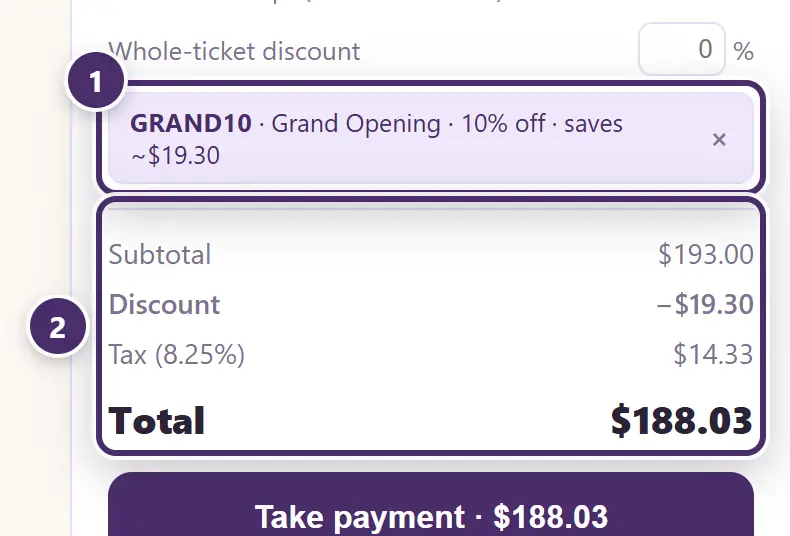
- The coupon, applied. The code, what it's called, and what it took off. × removes it again.
- The totals, with the coupon in.
A code Inky doesn't know, one that isn't live yet, has expired, has been turned off, or has hit its cap is refused with the reason. A booth-only coupon takes money off that booth's lines and leaves the rest of the sale alone.
The rewards program
Points by phone number. A member earns points on what they actually pay, before tax, and cashes them in as store credit at the counter. Off until you opt in — the switch above — because outstanding points are a promise the shop has made.
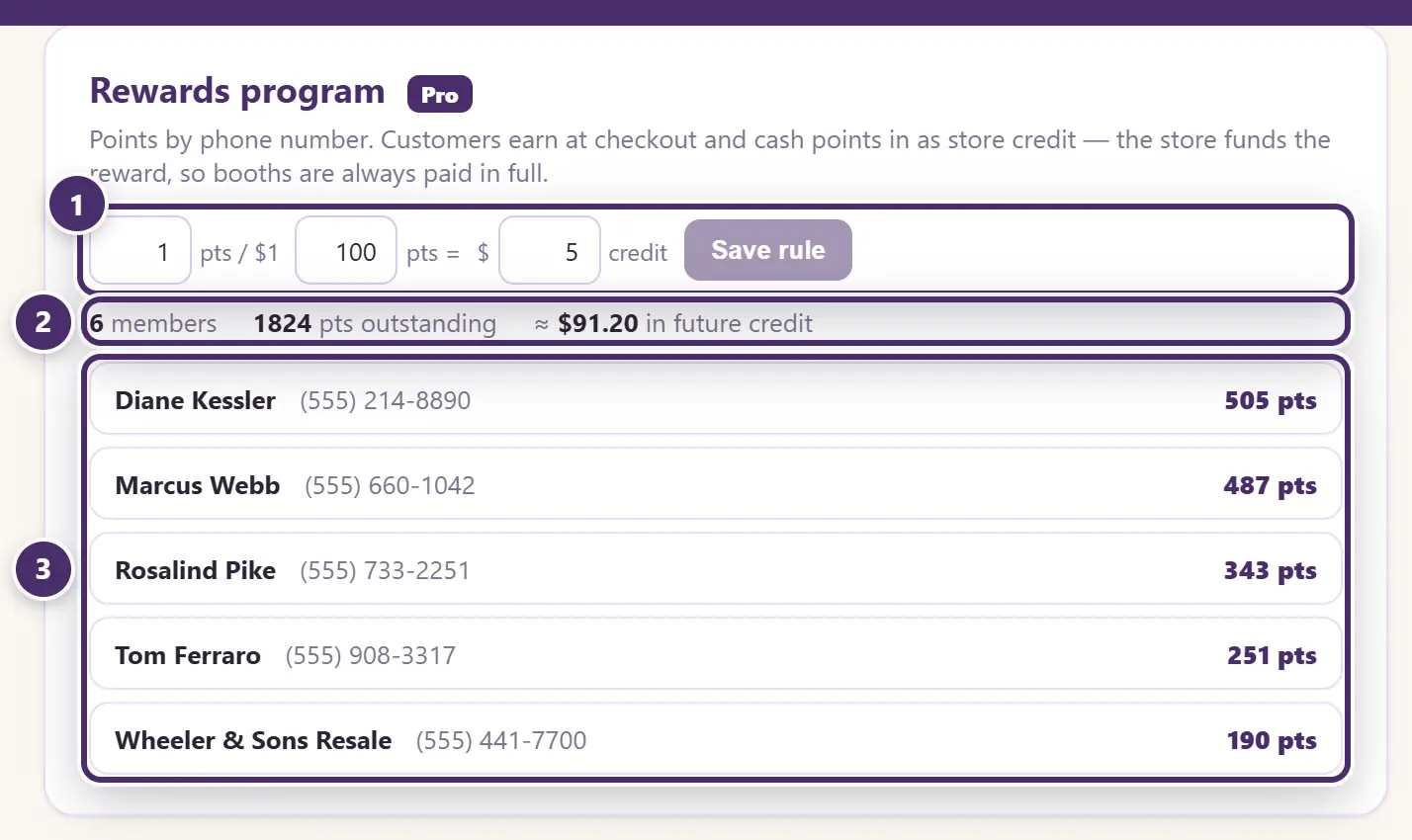
- The rules: points per pre-tax dollar actually paid, how many points one redemption spends, and what that redemption is worth in store credit. The defaults are 1 point per dollar, and 100 points for $5.
- What today's outstanding points are worth at those rules. Treat it as a liability, like a gift card.
- Your top members and their balances. A member is just a customer with a phone number on file.
At checkout:
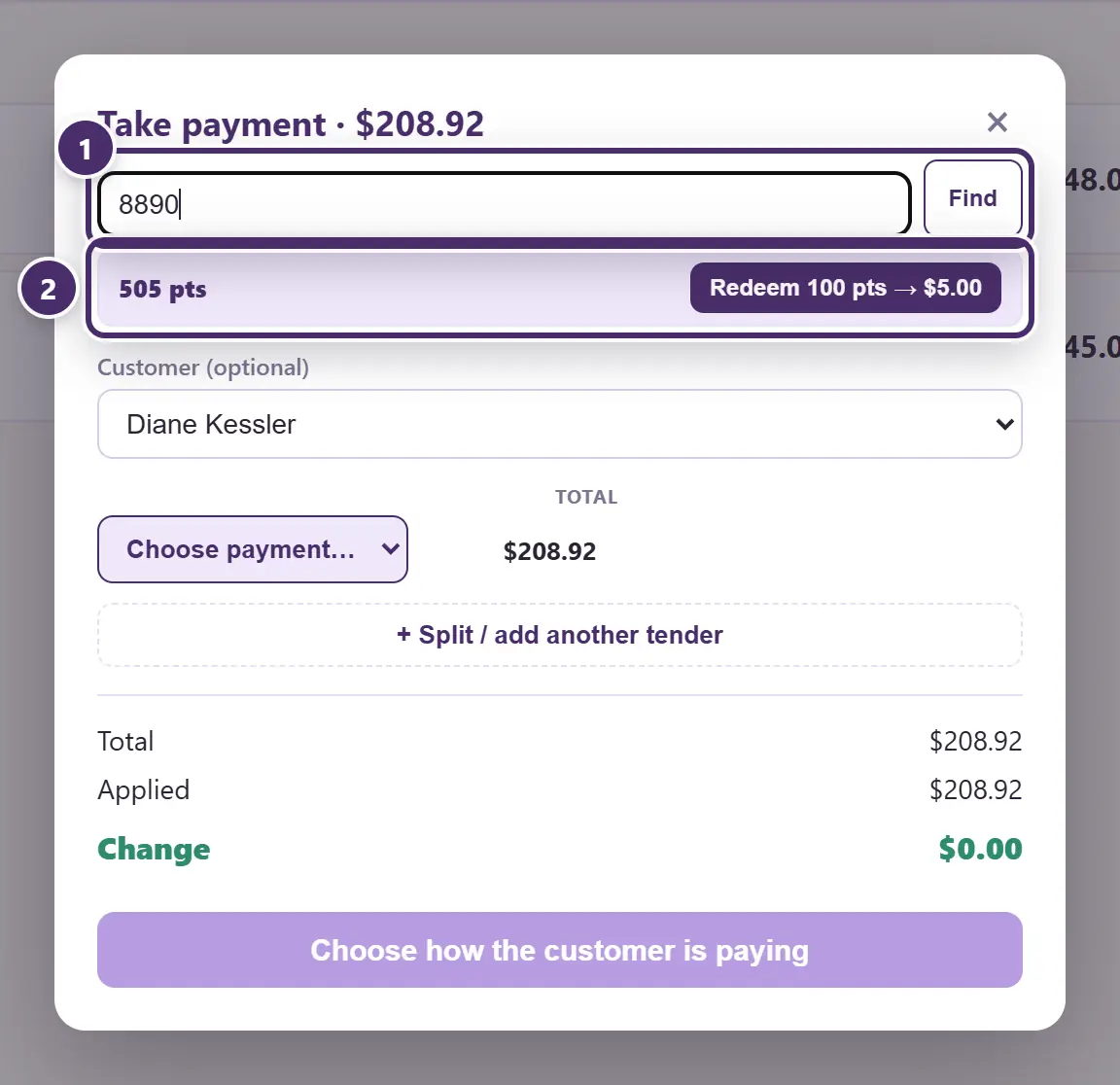
- Find the member by phone — the whole number, or just the last four. A number Inky doesn't know can be enrolled on the spot by typing the name in the customer box.
- Their balance, and — once it reaches a redemption's worth — a Redeem button. Redeeming turns a block of points into store credit and puts it on this sale as a tender line; press it again for another block.
Points are earned when the sale goes through, on each line, at the pre-tax price paid. Voiding the sale takes them back. Finding the member also attaches them as the sale's customer, so their purchase history builds at the same time.
When the internet is out
All of it is local. Promotions and markdowns apply, coupons redeem and count, points earn and redeem — none of it needs a connection.
Guide for Inky Mall OS 0.16.0, updated Nov 20, 2026 · Download the whole guide (PDF)