
12 · Financials & reports
On this page
Financials is where you read the shop. Pick a period, narrow it if you like, and the same set of reports is there for every edition: the Summary, the Vendors report, Transactions, Sales Tax, and the Account. Anything on this tab can go out as an Excel workbook or a PDF, or straight to the printer. It sits behind the owner's PIN.
Nothing here moves money — that's Payouts. The Pro reports (Insights, Locations, the Report builder) and the Inky Accounting tabs (Profit & Loss, Expenses, Year-end tax) have their own chapter: Insights & Accounting.
What you are looking at
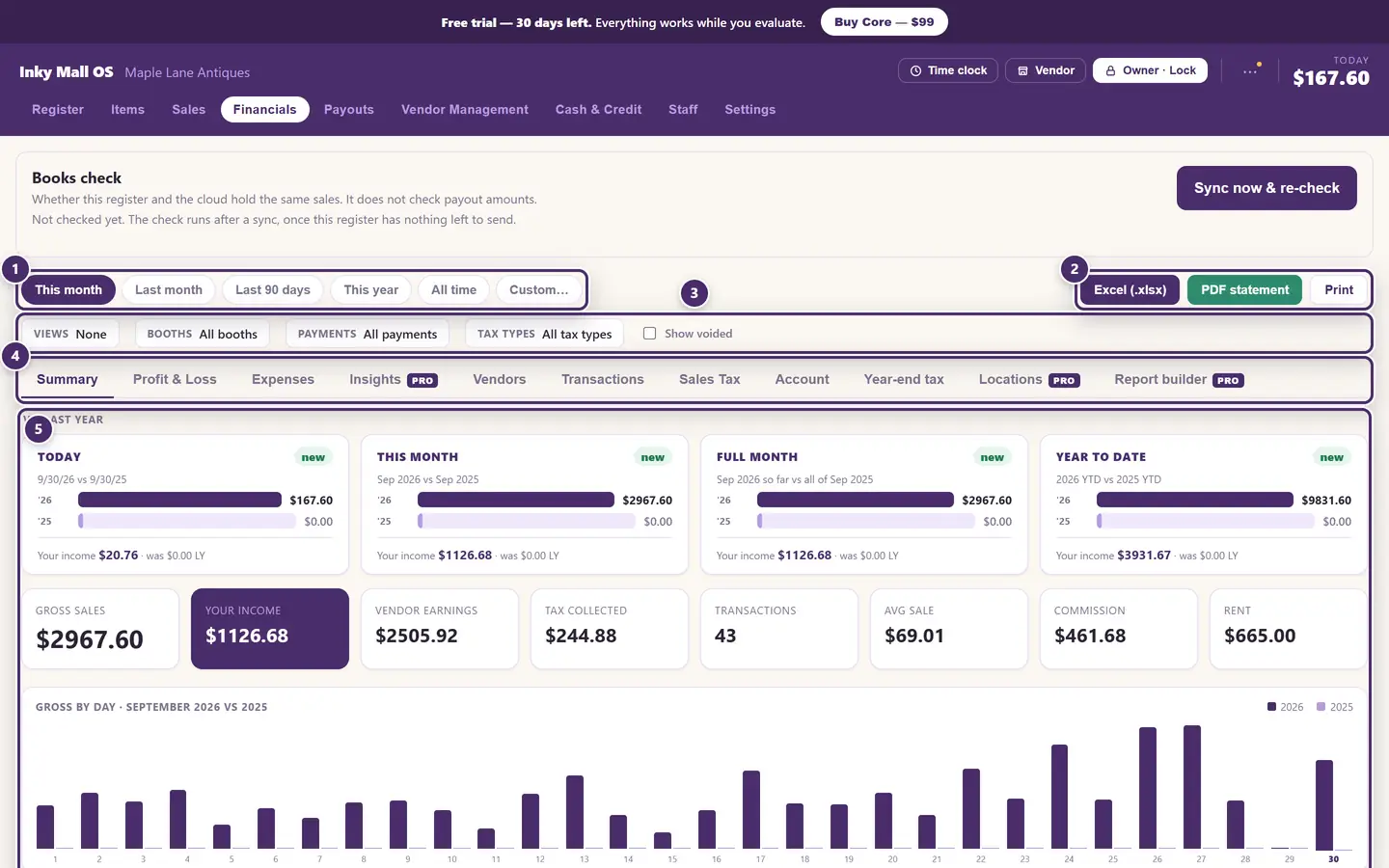
- The period. This month, last month, the last 90 days, this year, all time, or Custom… for any two dates.
- Take it with you. Excel (.xlsx) writes every report for the period into one workbook — a sheet each for Summary, Vendors, Transactions, Sales Tax and Account. PDF statement lays the same out for printing or emailing. Print sends the tab you're looking at to the printer.
- Filters. Certain booths, certain payment types, certain tax categories, voided sales or not — and saved views that remember a combination.
- The reports. Tabs marked PRO need Inky Mall OS Pro; a padlock means Inky Accounting.
- The report itself, for the period and filters chosen above.
On a Cloud+ shop a Books check panel sits above all this, saying whether this register and the cloud hold the same sales — see Cloud+ & sync.
The Summary
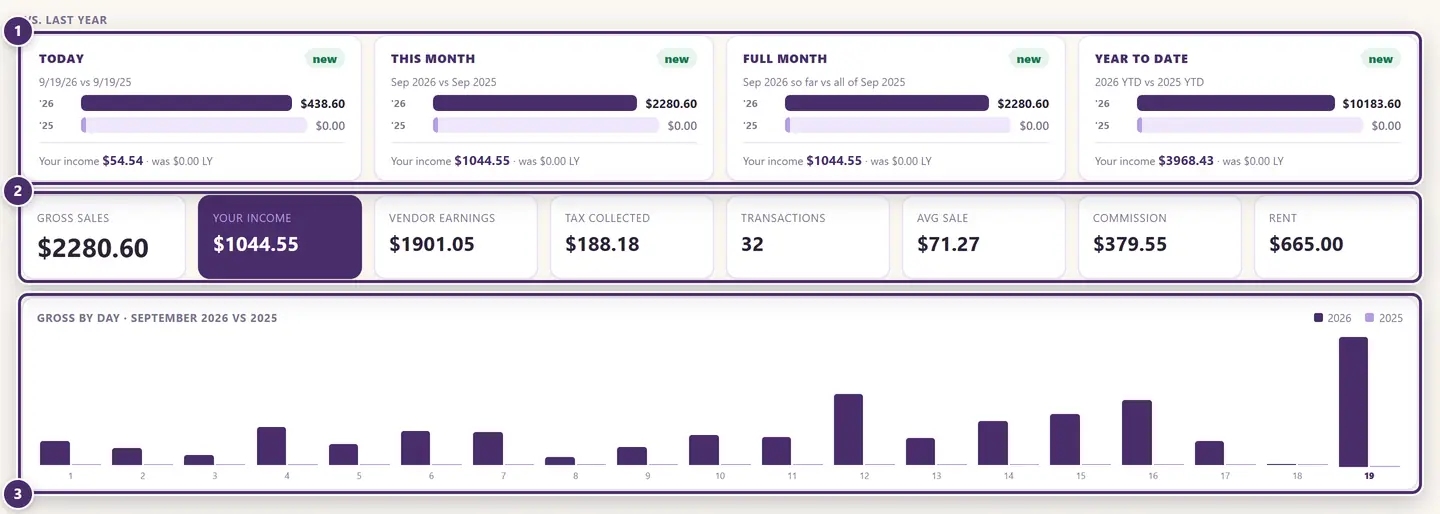
- Against last year. Today, this month so far, the full month, and the year to date — each against the same span a year ago, with the change. A shop in its first year sees zeros on the right until the anniversaries come round.
- The numbers for the period. Gross sales is everything rung. Your income is the shop's share — commission plus rent. Vendor earnings is what the booths keep. Then the tax collected, how many transactions, the average sale, and commission and rent on their own.
- Gross by day, this month against the same month last year.
Filters and saved views
Every report on the tab obeys the same filters.
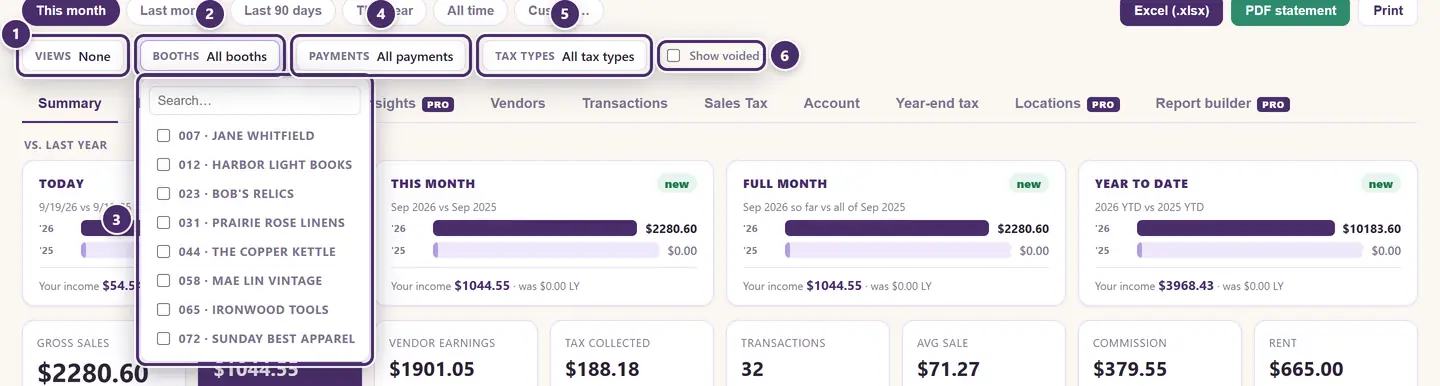
- Views. Save the period, the filters and the tab you're looking at under a name — Booth 23 · this month, Resale only · this year — and bring the whole thing back in one click.
- Booths. Tick as many as you like; every report narrows to just those.
- The booth picker, with a search box for a long list.
- Payments. Cash, card, check, or split sales.
- Tax types. Taxable, non-taxable, resale.
- Show voided puts returned sales back into the tables, marked as voids. They are left out otherwise, so the figures are money that stayed.
When a filter is on, the Summary says filtered beside the year-over-year cards, and Clear filters appears at the end of the row.
Vendors
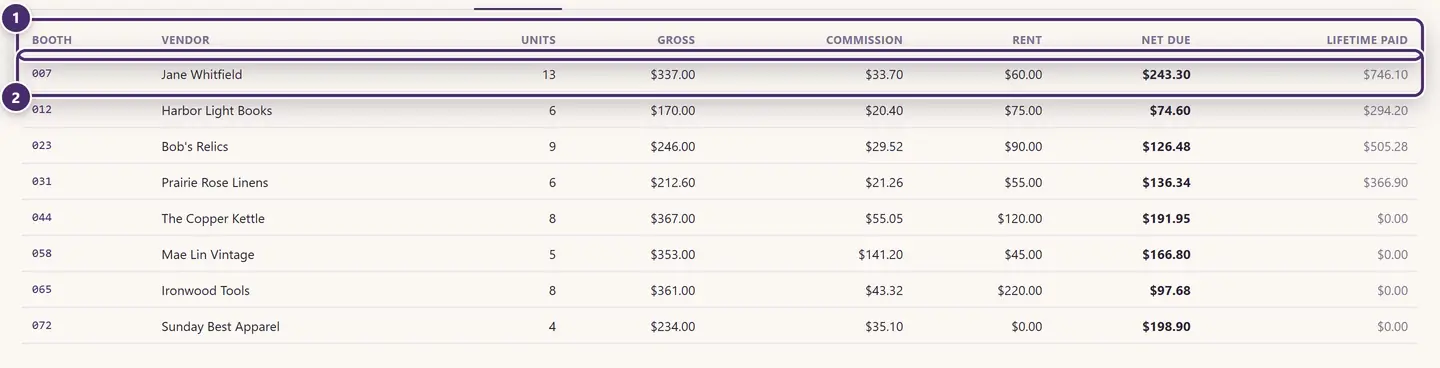
- Per booth, for the period: units sold, gross, the commission the shop kept, rent, and what the booth is due — plus Lifetime paid, everything this booth has ever been paid on closed payouts.
- One booth. These are the same figures a payout uses; this is the place to read them, and Payouts is the place to pay them.
Transactions
Every line sold in the period, one row each.
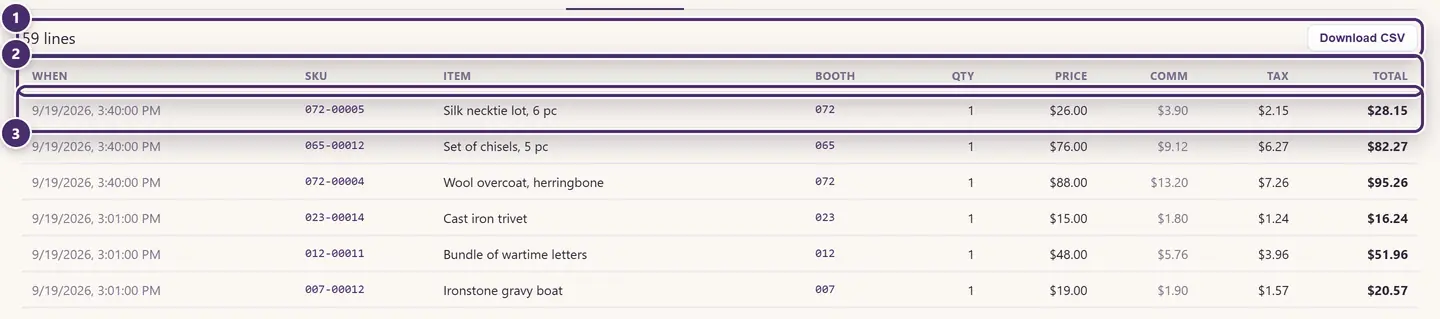
- How many lines, and Download CSV for exactly these rows — the filters apply.
- The columns: when, the SKU, the item, the booth, quantity, the price it sold for, the commission on it, the tax, and the line total.
- One line. Small tags mark the exceptions: consign for a consignment item, resale for a tax-exempt sale, void, Custom sale for a line rung by hand, and an asterisk on a price that was edited at the register.
This is the report to reach for when a vendor asks "what exactly sold, and when?".
Sales Tax
The report for the tax return.
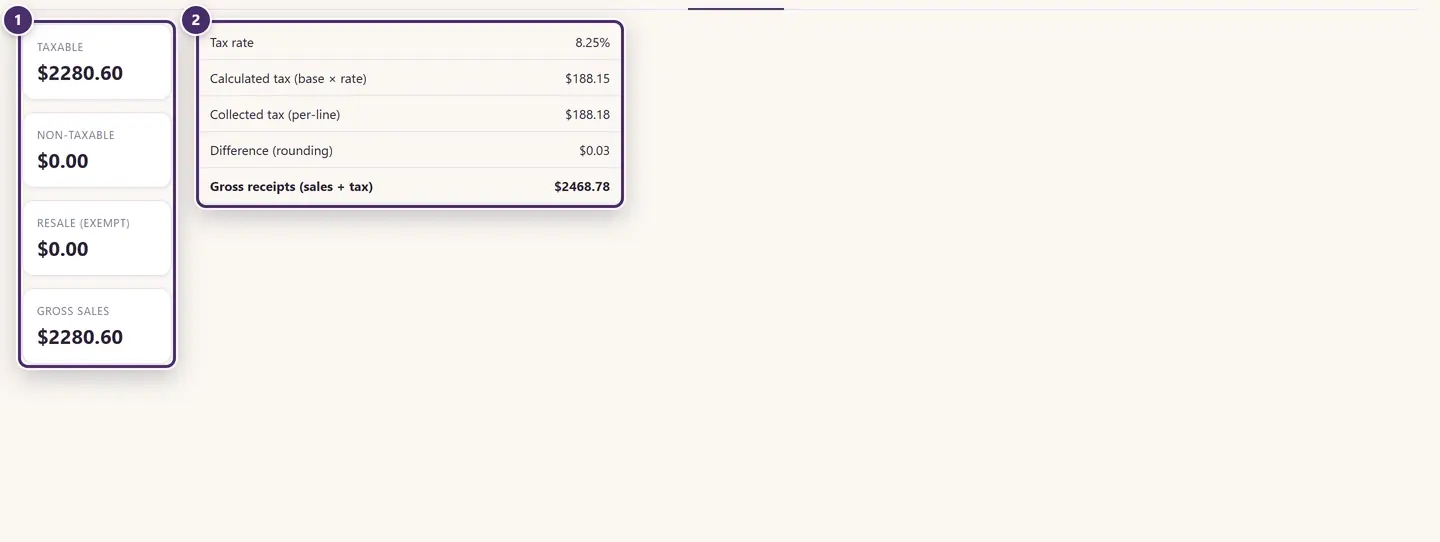
- What was taxable, what wasn't, and what went out exempt to resellers — and the gross they add up to.
- The tax itself: the rate, tax as calculated on the taxable base, tax as actually collected line by line, the rounding difference between the two, and gross receipts (sales plus tax). Because Inky taxes each line and rounds to the cent, collected can differ from calculated by a few cents over a month; the report shows both so the return reconciles.
Account
The long view: not a period, but the shop's position.
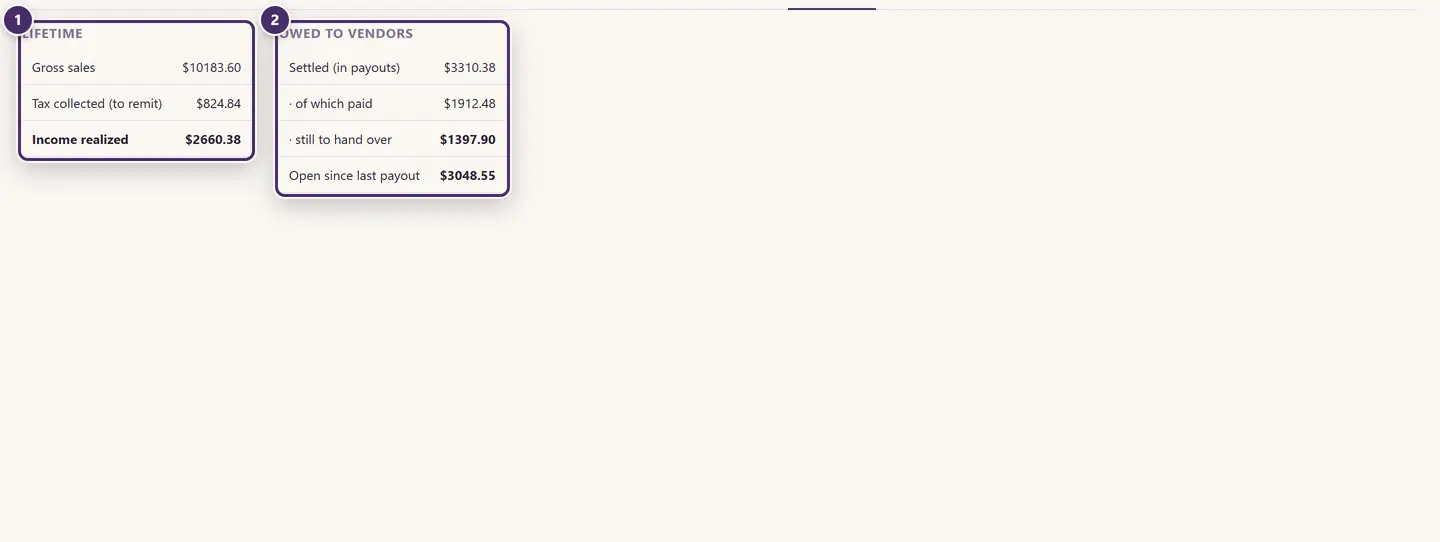
- Lifetime. Everything ever sold, the tax collected that is owed to the state, and the income the shop has actually realized.
- Owed to vendors, right now. What closed payouts have settled, how much of that has been handed over and how much hasn't, and what has built up since the last payout was closed. The last two lines together are what you would owe the booths if you closed today.
When the internet is out
Every report here is built from the data on this computer, so all of it works offline — including the exports. On a Cloud+ shop the Books check waits for a connection.
Guide for Inky Mall OS 0.16.0, updated Nov 20, 2026 · Download the whole guide (PDF)